wxDataViewListCtrl sizing questions

I’m having trouble understanding how a DataViewListCtrl is sized.

I have created a Frame in wxFormBuilder with the following nested BoxSizer structure:

  • bSizer1 (Vertical)
    • bSizer2 (Horizontal, proportion 1)
    • bSizer3 (Vertical, proportion 1)
    • bSizer4 (Horizontal, proportion 3)
      • DataViewListCtrl (name dvRegList)
        • DataViewListColumn
        • DataViewListColumn
        • DataViewListColumn

If bSizer4 is Vertical orientation, dvRegList does not expand horizontally to fill the sizer. It’s just a tiny border on the far left of the sizer, the height of the header row and just a few pixels wide. This is surprising because a button and static text in a vertical sizer display normally.

If bSizer4 is Horizontal, dvRegList expands horizontally but displays only the header, with none of the rows, even if I resize the window so that there’s obviously room for the rows.

The only way I can get it to display rows is to set a minimum height, and when I do it now behaves as expected… it fills its sizer both vertically and horizontally, and resizes with the window.

So I have 2 questions:

  • Why does the DataViewListCtrl not fill the sizer when the sizer’s orientation is Vertical
  • Why (when the sizer is Horizontal) does it need to have an explicit minimum vertical height set.

I would have expected the control to fill its sizer by default, and I can’t find anything in the docs that specifies the observed behavior.

I’m sure I’m missing something obvious, but would like to know where this is documented.

Thanks

To try to understand the issue, I have tried to create some example code. I put panels with distinct background colours in bSizer2 and bSizer3 to make it more obvious where they are located.

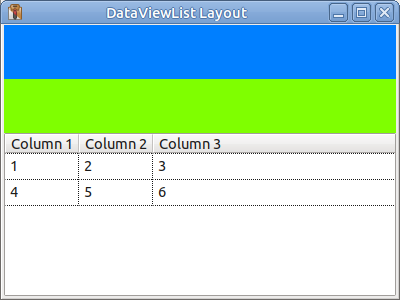
In the example it didn’t seem to make any difference if bSizer4 was horizontal or vertical, dvRegList is displayed and resizes as I would expect, but perhaps I am not understanding the problem.

import wx
import wx.dataview as dv

class MyFrame(wx.Frame):
    def __init__(self, *args, **kwds):
        wx.Frame.__init__(self, *args, **kwds)

        self.panel1 = wx.Panel(self, wx.ID_ANY)
        bsizer1 = wx.BoxSizer(wx.VERTICAL)
        bsizer2 = wx.BoxSizer(wx.HORIZONTAL)
        bsizer1.Add(bsizer2, 1, wx.EXPAND, 0)
        self.panel2 = wx.Panel(self.panel1, wx.ID_ANY)
        self.panel2.SetBackgroundColour(wx.Colour(0, 127, 255))
        bsizer2.Add(self.panel2, 1, wx.EXPAND, 0)
        bsizer3 = wx.BoxSizer(wx.VERTICAL)
        bsizer1.Add(bsizer3, 1, wx.EXPAND, 0)
        self.panel3 = wx.Panel(self.panel1, wx.ID_ANY)
        self.panel3.SetBackgroundColour(wx.Colour(127, 255, 0))
        bsizer3.Add(self.panel3, 1, wx.EXPAND, 0)
        bsizer4 = wx.BoxSizer(wx.VERTICAL)
        bsizer1.Add(bsizer4, 3, wx.EXPAND, 0)
        self.dvRegList = dv.DataViewListCtrl(self.panel1, wx.ID_ANY, style=dv.DV_HORIZ_RULES|dv.DV_VERT_RULES)
        bsizer4.Add(self.dvRegList, 1, wx.EXPAND, 0)
        self.panel1.SetSizer(bsizer1)
        self.Layout()
        
        for c in range(3):
            self.dvRegList.AppendTextColumn(f"Column {c+1}")
            
        self.dvRegList.AppendItem(["1", "2", "3"])
        self.dvRegList.AppendItem(["4", "5", "6"])
        

if __name__ == "__main__":
    app = wx.App()
    frame = MyFrame(None, wx.ID_ANY, "DataViewList Layout", size=(400, 300))
    frame.Show()
    app.MainLoop()

Tested using: wxPython 4.2.5 gtk3 (phoenix) wxWidgets 3.2.9 + Python 3.12.3 + Linux Mint 22.3

Well, there’s clearly a lot I’m missing here, and wxFormBuilder isn’t helping.

You have a top-level panel as a child of the frame, and wxFormBuilder won’t allow that.
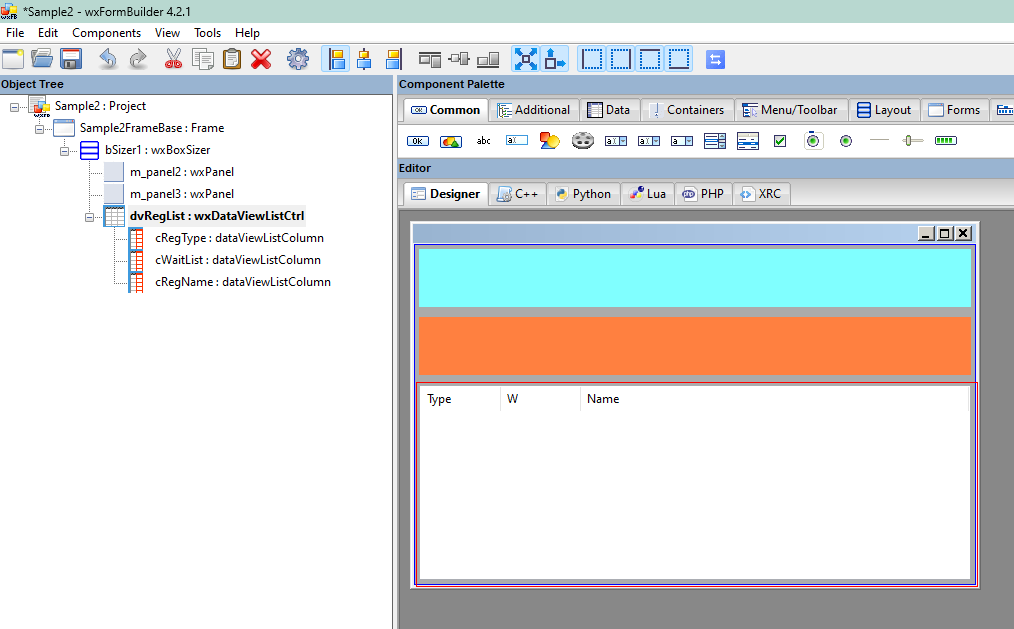
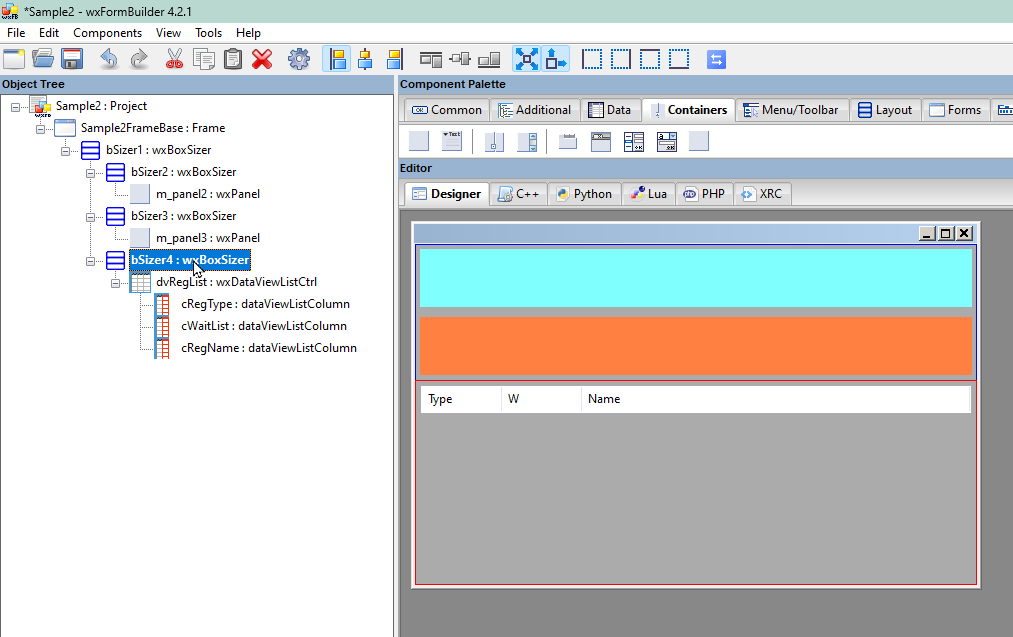
Here’s what I see in wxFormBuilder:

The displayed window looks identical to what wxFormBuilder previews but I can’t add a second image.

The code generated by wxFormBuilder:

# -*- coding: utf-8 -*-

###########################################################################
## Python code generated with wxFormBuilder (version 4.2.1-0-g80c4cb6)
## http://www.wxformbuilder.org/
##
## PLEASE DO *NOT* EDIT THIS FILE!
###########################################################################

import wx
import wx.xrc
import wx.dataview

import gettext
_ = gettext.gettext

###########################################################################
## Class Sample2FrameBase
###########################################################################

class Sample2FrameBase ( wx.Frame ):

    def __init__( self, parent ):
        wx.Frame.__init__ ( self, parent, id = wx.ID_ANY, title = wx.EmptyString, pos = wx.DefaultPosition, size = wx.Size( 571,369 ), style = wx.DEFAULT_FRAME_STYLE|wx.TAB_TRAVERSAL )

        self.SetSizeHints( wx.DefaultSize, wx.DefaultSize )

        bSizer1 = wx.BoxSizer( wx.VERTICAL )

        bSizer2 = wx.BoxSizer( wx.HORIZONTAL )

        self.m_panel2 = wx.Panel( self, wx.ID_ANY, wx.DefaultPosition, wx.DefaultSize, wx.TAB_TRAVERSAL )
        self.m_panel2.SetForegroundColour( wx.SystemSettings.GetColour( wx.SYS_COLOUR_WINDOW ) )
        self.m_panel2.SetBackgroundColour( wx.Colour( 128, 255, 255 ) )

        bSizer2.Add( self.m_panel2, 1, wx.EXPAND |wx.ALL, 5 )


        bSizer1.Add( bSizer2, 1, wx.EXPAND, 5 )

        bSizer3 = wx.BoxSizer( wx.VERTICAL )

        self.m_panel3 = wx.Panel( self, wx.ID_ANY, wx.DefaultPosition, wx.DefaultSize, wx.TAB_TRAVERSAL )
        self.m_panel3.SetBackgroundColour( wx.Colour( 255, 128, 64 ) )

        bSizer3.Add( self.m_panel3, 1, wx.EXPAND |wx.ALL, 5 )


        bSizer1.Add( bSizer3, 1, wx.EXPAND, 5 )

        bSizer4 = wx.BoxSizer( wx.HORIZONTAL )

        self.dvRegList = wx.dataview.DataViewListCtrl( self, wx.ID_ANY, wx.DefaultPosition, wx.DefaultSize, wx.dataview.DV_ROW_LINES )
        self.cRegType = self.dvRegList.AppendTextColumn( _(u"Type"), wx.dataview.DATAVIEW_CELL_ACTIVATABLE, -1, wx.ALIGN_LEFT, wx.dataview.DATAVIEW_COL_RESIZABLE )
        self.cWaitList = self.dvRegList.AppendTextColumn( _(u"W"), wx.dataview.DATAVIEW_CELL_INERT, -1, wx.ALIGN_LEFT, wx.dataview.DATAVIEW_COL_RESIZABLE )
        self.cRegName = self.dvRegList.AppendTextColumn( _(u"Name"), wx.dataview.DATAVIEW_CELL_INERT, -1, wx.ALIGN_LEFT, wx.dataview.DATAVIEW_COL_RESIZABLE )
        bSizer4.Add( self.dvRegList, 1, wx.ALL, 5 )


        bSizer1.Add( bSizer4, 3, wx.EXPAND, 5 )


        self.SetSizer( bSizer1 )
        self.Layout()

        self.Centre( wx.BOTH )

    def __del__( self ):
        pass

And the main program:

import Sample
import wx

class Sample2Frame(Sample.Sample2FrameBase):
    def __init__(self, parent):
        super(Sample2Frame, self).__init__(parent)
    def OnQuit(self, event):
        self.Close(True)

app = wx.App()
frm = Sample2Frame(None)

frm.dvRegList.AppendItem(["Type 1", "N", "John Doe"])
frm.dvRegList.AppendItem(["Type 2", "N", "Fred Bloggs"])
frm.dvRegList.AppendItem(["Type 1", "N", "Jane Doe"])

frm.Show()
frm.dvRegList.Refresh()

app.MainLoop()
I used wxGlade to initially create my example. It automatically adds a Panel to every Frame. I seem to remember reading that there are good reasons for doing so, but my failing memory can’t recall them.

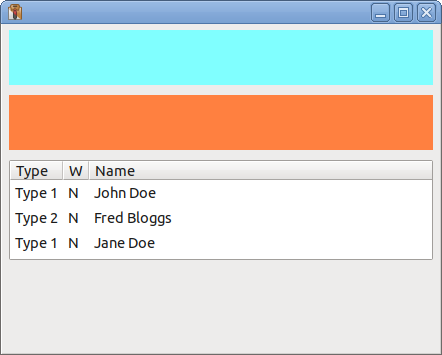
Edit: when I run your example on my linux PC it does show the data items:

Edit2: when I added wx.EXPAND to this line:

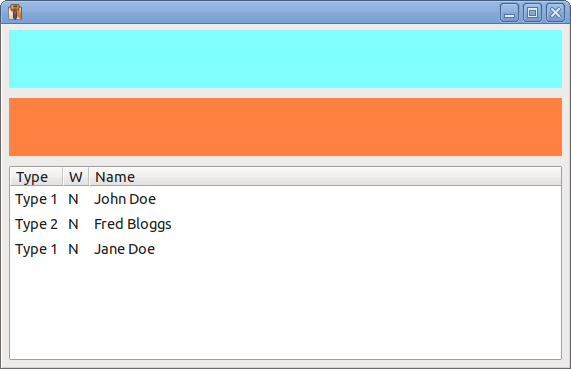
bSizer4.Add( self.dvRegList, 1, wx.EXPAND|wx.ALL, 5 )

then dvRegList expanded vertically:

Thanks for checking that out.

I have a Linux system as well and I’ll try it there. If I get the same results as you I guess I’ll file a bug, but it’s not clear against which component. Could be the Windows versions of wxWidgets or wxPython.

Also I’ll check out wxGlade. Thanks again.

I modified my example to remove the top level panel that wxGlade adds and that version works the same as the original. That makes me think that it is added because it helps on other OS.

wxGlade does not directly support the DataViewListCtrl. What I do for unsupported controls is add a “custom widget” and then set it to the required class. See the documentation at Custom Widget — wxGlade 1.1.1 documentation

The panel handles keyboard navigation (e.g. the Tab key). Also, a frame without a panel has a different background colour on some systems, e.g. on Windows.
From looking at the example above, it seems that wxFormbuilder requires a sizer ‘between’ frame and panel. wxGlade did so until some years ago and I have removed this as it was really odd.

1 Like

Well, I accidentally found the magic incantation to make it work in wxFormBuilder, and learned something important about how nesting works. It appears wxFormBuilder wants every container to embed a sizer at the container’s top level, and children of the container must live inside the sizer. Once I got to that point it all works as expected.

In my non-working initial example I had sizers directly nested within sizers. I understand this is supposed to be allowed, but in this case must have confused some part of the layout code.

Thanks for taking the time to treat my question seriously, your example helped.