Hi guys,
I would like to create something like the attached image below
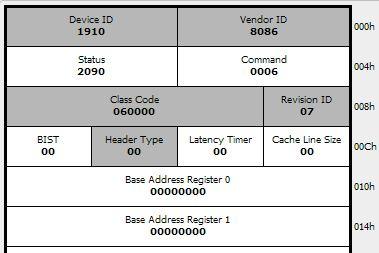
The individual cells would be clickable so that I could respond to them e.g. update the values. Which control should I use for this type of thing?
Thanks,
M
Hi guys,
I would like to create something like the attached image below
The individual cells would be clickable so that I could respond to them e.g. update the values. Which control should I use for this type of thing?
Thanks,
M
Well, there's no pre-canned control that's going to give you something like that.
If I were doing it, I'd probably create four simple custom controls based on wxPanel, one for each width. Each one could display the label and the current value, centered, Then, when the panel gets a click, you could expose a previously hidden edit control, aligned at the right spot. You could then build up your overall display using sizers with zero padding.
It wouldn't really be all that difficult.
On Dec 11, 2018, at 3:33 PM, Maichmaich <nick.kigs@gmail.com> wrote:
I would like to create something like the attached image below
...(PCI configuration space chart deleted)...
The individual cells would be clickable so that I could respond to them e.g. update the values. Which control should I use for this type of thing?
—
Tim Roberts, timr@probo.com
Providenza & Boekelheide, Inc.
Check wx.Grid in the demo.
HTH
Niki
On 12.12.18 г. 1:33 ч., Maichmaich wrote:
Hi guys,
I would like to create something like the attached image below
[image: pci_ux.JPG]
The individual cells would be clickable so that I could respond to them
e.g. update the values. Which control should I use for this type of thing?
If you just want to click and update and don't need further interaction, the easiest option would be to use one of the HTML controls.
(E.g. wx.html.HtmlWindow or wx.html2.WebView)
Regards,
Dietmar
On 12.12.2018 00:33, Maichmaich wrote:
The individual cells would be clickable so that I could respond to them e.g. update the values. Which control should I use for this type of thing?