With most people having widescreen monitors, it would make sense for
some toolbars not to place them at the top, but at the side of a window
with a vertical orientation.
Is there a way to have buttons, checkboxes and labels with vertical
text (without drawing the text myself or the workaround of converting
text into bitmaps or placing one character per line)?
I remember to have seen something like a button in a menubar being rotated.
I think it was the AUI example of the wx demos.
and yes, btw. Is it possible to have the tabs of the managed panes verticals
organized?
If you mean the pane captions, the answer is "yes" (but only with
wx.lib.agw.aui, not with wx.aui). In order to get that you can simply
do:
Notice the call to "CaptionVisible(True, left=True)". The "left"
keyword will force the pane to show its caption rotated 90 degrees
(vertical) and it will be positioned on the left instead of the top.
If you mean notebook tabs, the answer is "no", at the moment. One of
the "todos" in the AUI implementation reads:
- Implement ``AUI_NB_LEFT`` and ``AUI_NB_RIGHT`` tab locations in `AuiNotebook`;
With most people having widescreen monitors, it would make sense for
some toolbars not to place them at the top, but at the side of a window
with a vertical orientation.
Is there a way to have buttons, checkboxes and labels with vertical
text (without drawing the text myself or the workaround of converting
text into bitmaps or placing one character per line)?
Thanks for the try, but I do not mean the caption. I mean, … when you stak two or more panes together you get a tabbar in which you can select which of the stacked panes you want to see and use. I mean these tabs.
When I use Panes to be stacked on the sides (L,R)The user can not see all of then stacked at once cause the tabs are horizontal manged.
Also when I click to minimize one of the panes, since all of them are managed on one stack, all of them get minimzed and are represented by one icon to be maximized again. I would be great if the user could choose weather every of this stacked panes would be represented by one icon, or by several Icon That we also could change. Like in the Opera browser the bar on the left side.
Sorry Andrea, I don’t mean to bug you. AGW has a really great potencial, there are just some of the features that would be really usefull, and are not implemented yet.
I know you do not have the time to work on it without break. Let’s make a deal. You implement the requested usefull features, and I’ll dicument it. Deal?
Thanks for the try, but I do not mean the caption. I mean, .... when you
stak two or more panes together you get a tabbar in which you can select
which of the stacked panes you want to see and use. I mean these tabs.
When I use Panes to be stacked on the sides (L,R)The user can not see all of
then stacked at once cause the tabs are horizontal manged.
Also when I click to minimize one of the panes, since all of them are
managed on one stack, all of them get minimzed and are represented by one
icon to be maximized again. I would be great if the user could choose
weather every of this stacked panes would be represented by one icon, or by
several Icon That we also could change. Like in the Opera browser the bar on
the left side.
To me it doesn't make much sense to minimize a notebook tab. If you
dock a panel onto another, you create a notebook (a tabbed window). At
that point, the 2 panes become a "single" entity when it comes to
minimization/maximization. I don't use Opera and honestly, as a long
time Windows/Ubuntu user, I am always a bit wary of Mac-derived
things. No offence intended to anyone, it's just my personal
preference.
Anyway, regarding the vertically stacked tabs and single-tab
minimization: if you can come up with a patch, I'll gladly apply it.
But as I do not generally agree with your point of view in both
arguments (as far as I remember, Visual Studio doesn't do any of the
things you mentioned, but please correct me if I am wrong), I am not
going to work on something I feel uneasy about.
And yes Andrea, I found a small bug in the resizeWidget. The image that the
user clicks in order to resize it leaves a trail behind it.
I looked up in demos to see if I am missing anything but did not find
anything.
The resizewidget lives in wx.lib, not in wx.lib.agw. It's not one of
the widgets I wrote. In any case, it works fine for me on Windows 7. I
think that, if you see anything strange, you should at the very least:
1) Mention platform, Python and wxPython versions;
2) Possibly provide a small, runnable sample that demonstrates the
problem if it is not reproducible in the sample.
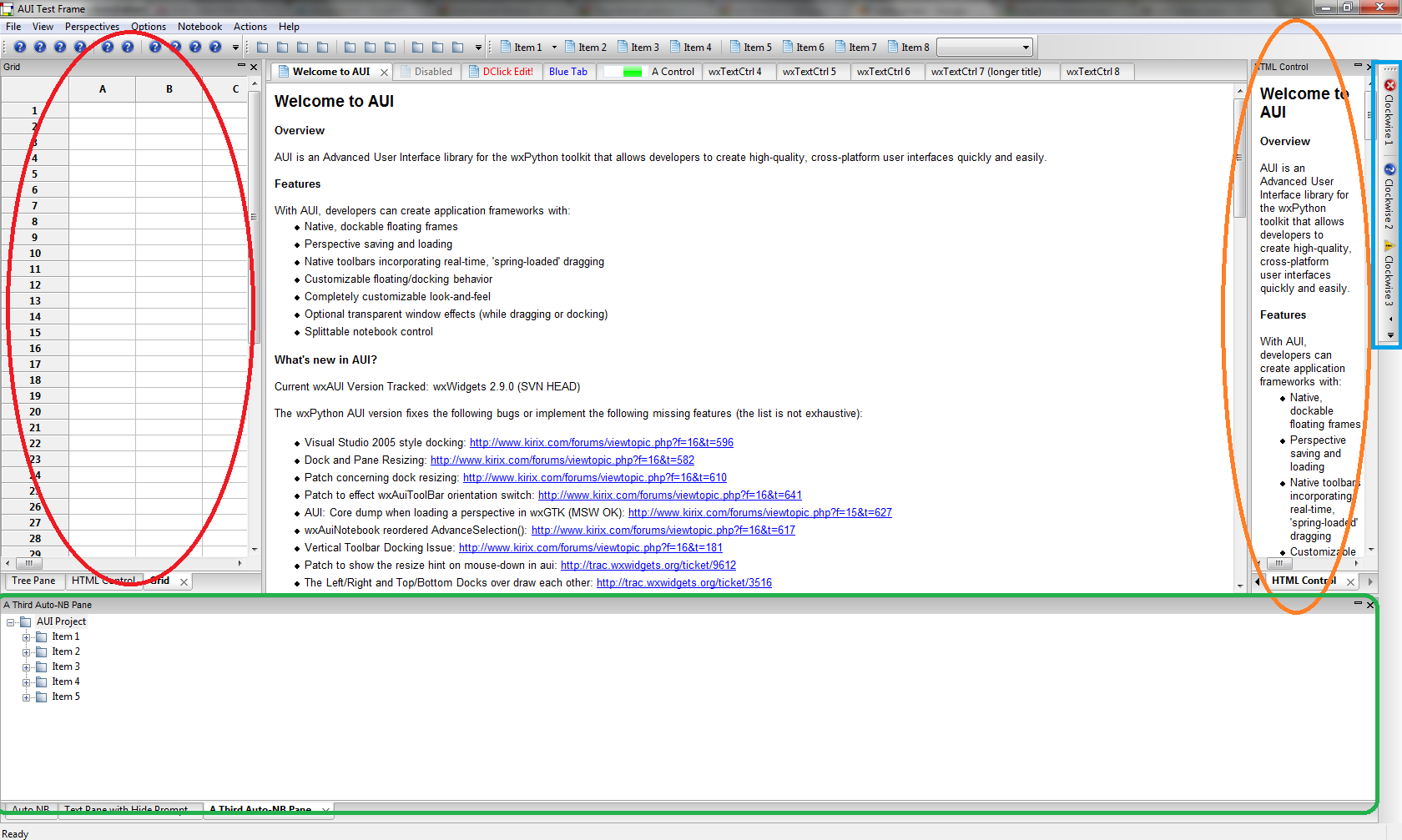
You’ll find an image attached that helps with the in depth explanation.
On the bottom you can see a green square. In a situation like this the horizontal panes are perfect. You can see all the tools you have, at once.
The red circle shows a pane notebook with 3 tabs. managed on the bottom of the notebook arranged horizontally. The same panes can be found on the right as well (orange circle). The only difference between them is that the left one has a bigger width then the right one. But on the right side you can always see only one pane, because it is not wide enough. If the tabs would be vertically in this example on th right, They could be observed and visible without having to click throuh the notebook.
Something like this can bee seen in every user friendlier IDE like MS visual studio as well, WingIDE, …
On the far right you can see a blue square. If the tabs were like this, the would be perfect. every tab would be visible and reachable with one click. from a point of useability, perfect.
I mentioned Opera as an example. This can be found in various other applications as well. VS too.
The thing is that this things would really be usefull.
I don't have an opinion about single-tab minimization, but vertically stacked tabs are really useful.
I haven't looked recently, but it used to be that the notebook on wxGTK supported vertically-stacked tabs -- it was really nice. It really is a much better way to do tabs when you have quite a few of them (and their labels aren't really short) MSW's rows of tabs implementation is really, really horrible.
When I discovered that MSW didn't have them, I ended up having to make my own psuedo-notebook with vertically-stacked tabs (actually button in my case -- it doesn't look at good, but was easy to implement.
-Chris
···
On 8/2/11 2:13 PM, Andrea Gavana wrote:
Anyway, regarding the vertically stacked tabs and single-tab
minimization: if you can come up with a patch, I'll gladly apply it.
But as I do not generally agree with your point of view in both
arguments
--
Christopher Barker, Ph.D.
Oceanographer
Emergency Response Division
NOAA/NOS/OR&R (206) 526-6959 voice
7600 Sand Point Way NE (206) 526-6329 fax
Seattle, WA 98115 (206) 526-6317 main reception