Trouble vertically centering text in static text box

I am using an array of static text boxes and dynamically updating the text. I want the text to be centered, and I can only seem to center the text horizontally, but not vertically.
Windows 11 is the OS, and I have python 3.14 and wxPython 4.
When I create my static text boxes using the following call:

cel = wx.StaticText( panel, label="", size=( 40, 40), style=wx.ALIGN_CENTRE )

Using wx.ALIGN_CENTRE, wx.ALIGN_CENTER,
wx.ALIGN_CENTRE_HORIZONTAL and wx.ALIGN_CENTER_HORIZONTAL
I see only horizontal centering.
Using wx.ALIGN_CENTRE_VERTICAL and
wx.ALIGN_CENTER_VERTICAL, I see no centering at all.

I also see that this issue has been reported several times in the past, Jun 2011, Aug 2014, Nov 2016, and Jun 2024.
Is this a known issue?
Is there a workaround?

Also, the Buttons widget is properly centering my text by default!

Thank you,
-Mike

See the docu at wx.StaticText — wxPython Phoenix 4.2.3 documentation
Static text does not support vertical centering. Why should it? Buttons are something completely different. If you want a rectangular region with text then you should use a TextCtrl.
For vertically centering a label please use e.g. wx.ALIGN_CENTER_VERTICAL when adding the static text to a sizer. The sizer will align it vertically. The size of a static text just reserves space, but does only basic layouting.

For experimenting with layouts etc. I would suggest to use a GUI builder like wxGlade. That does include a tutorial for getting started with wxPython and it’s sizers as well.

1 Like

Thank you for your input, Dietmar!

I eventually came up with a workable solution by subclassing the static text widget with help from Google’s Gemini chat bot.
The solution is to create an OnPaint() method in the subclass and bind it to EVT_PAINT event.
Inside of OnPaint, an instance of the BufferedPaintDC class is created.
This allows the text to be copied and repainted at an offset.
I’ve included a bare bones implementation below:

class BorderedLabel( wx.StaticText ):
def init( self, parent, label=“”, offsets=(0, 0), *args, **kwargs ):
self.offsets = offsets

    # Add wx.FULL_REPAINT_ON_RESIZE to ensure the border redraws smoothly,
    super().__init__( parent, label=label, *args, **kwargs )

    # Bind the drawing event
    self.Bind( wx.EVT_PAINT, self.OnPaint )

def OnPaint( self, event ):
    dc = wx.BufferedPaintDC( self )
    dc.SetBackground(wx.Brush( self.GetBackgroundColour() ))
    dc.Clear( )
    x_offset, y_offset = self.offsets 
    dc.DrawText( self.GetLabel(), x_offset, y_offset)

def setOffsets( self, offsets=(0,0) ):
    self.offsets = ( offsets )

Respectfully, I would argue that that is the primary purpose of a static text box. I would assume that a widget with the sole purpose to display text should have as many options as possible to display that text.

In hindsight, I should have given a more detailed description of my requirements.
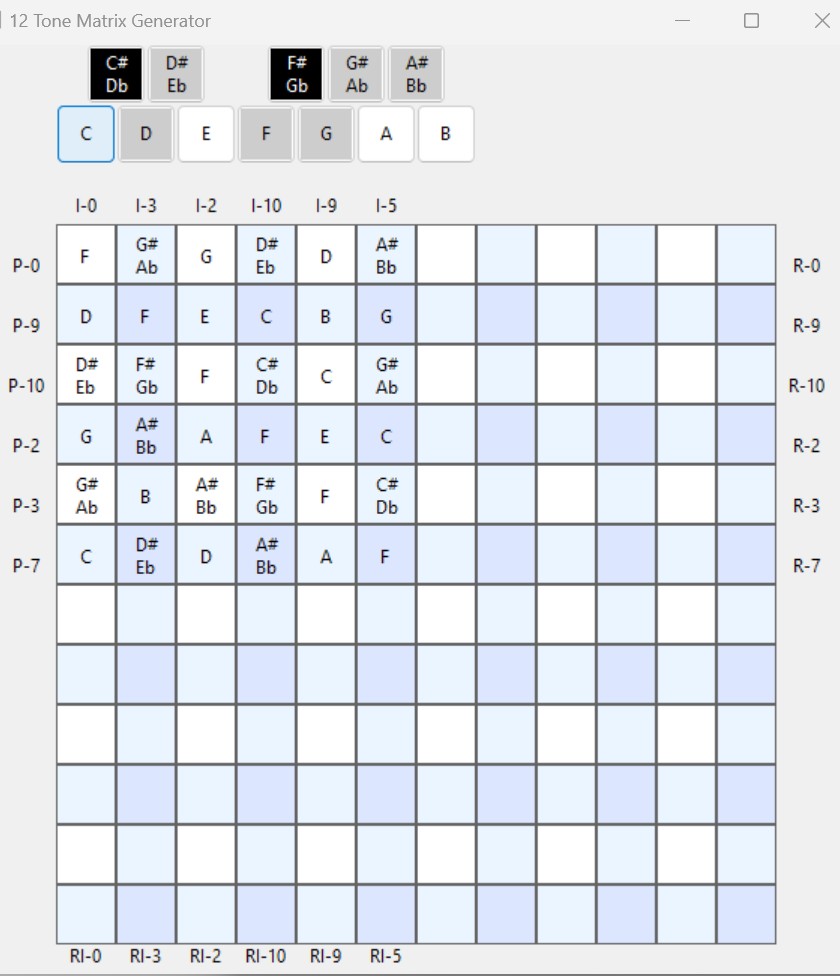
I am creating a dynamic text display of a 12 tone matrix.
The most straightforward implementation is a 12 by 12 grid of text boxes displaying different forms of the 12 pitches in Western music.

Your recommendation was to use a TextCtrl widget, but that widget is for text input. Text input can be inhibited, but it still displays a cursor inside the box. A screenshot after adding subclassing appears below.
Well, it’s a StaticText, i.e. a label. A text box would be the TextCtrl or StyledTextCtrl.
(But I found that the alignment options of TextCtrl would not have helped you. I agree that it would be desirable to have a text widget that supports the features you wanted to have and is less complex than the styled text controls.)

Depending on the platform the StaticText is a widget or will just be painted to the window.

For the bottom part of your window did you use the modified StaticText or a grid? I think a grid with custom renderers would have been the natural choice. See “Grid” and “GridLabelRendered” in the wx demo.

In general: When you write an application with a GUI toolkit then the toolkit should provide most of the widgets that you need. For the main window or widget, you might need to handle things yourself. When you write a document editor, you usually need to render the document yourself. Often you can use a grid, though. E.g. if you wanted to implement an office suite, you would probably need to render the word processor or presentation slides yourself. For the spreadsheet you could use the grid, but not if you would want to have more flexibility than the available spreadsheets. (I came from a platform where the spreadsheet was not just a grid.)

Regards,
Dietmar