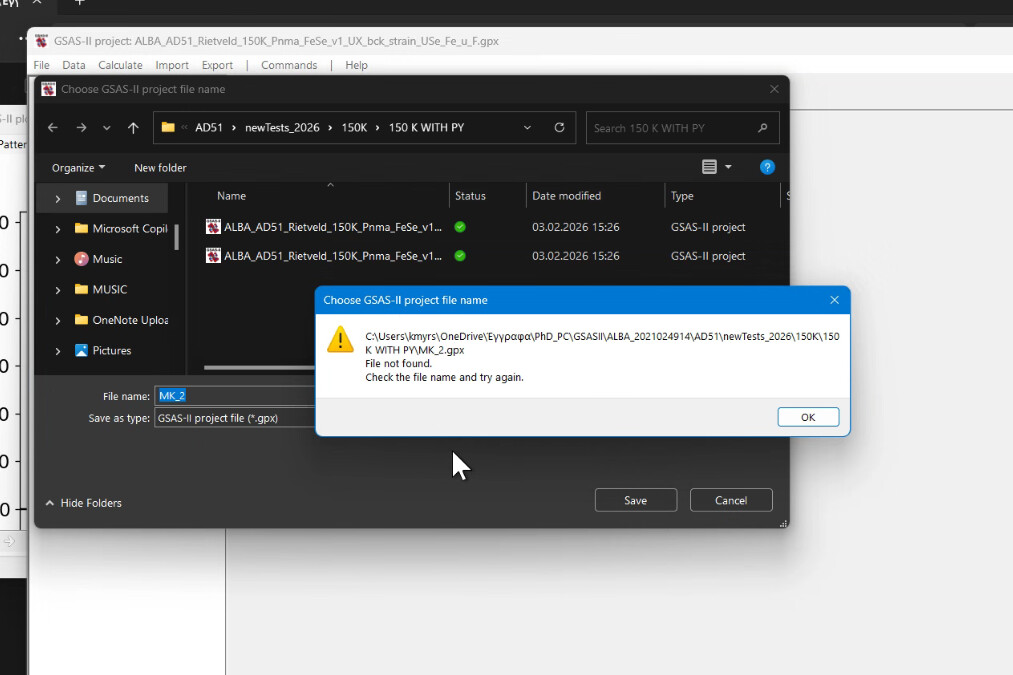
I’m having a strange result show up for a user of my software in Greece. The code in question is simply this:
        dlg = wx.FileDialog(self, 'Choose GSAS-II project file name', pth, self.newGPXfile,
            'GSAS-II project file (*.gpx)|*.gpx',wx.FD_SAVE|wx.FD_OVERWRITE_PROMPT)
This code works for thousands of people.
The FileDialog is failing with an error where it is reporting that the file (to be created) is not found. The directory has been selected from a Windows file browser, so I know that exists. The file, of course, should not yet exist. I have had the user select shorter versions of the path (for example, directly into the Documents directory, avoiding the directory name with spaces) and that does not help. Saving into a directory that is not mapped to OneDrive (the desktop) does work OK.
I have seen another strange thing for this user where UTF-8 is not their default, so that might be related, but I’m not a Windows user and don’t know what Windows settings would be related to that.
I’m stumped. Any suggestions would be welcome.
FWIW This is wx 4.2.3 in Python 3.13.7 on Windows 11.