I have used wxpython for years (decades?), but have only just started using wx.ListCtrl. I have a working example.
Now I want to be able to sort by a column when the user clicks on a column header (or column), and I am finding the attempt incredibly frustrating. I don’t understand what the class documentation says about sorting (what is a “sort indicator”? - this term is never defined, nor what you are supposed to do with it). I have tried several examples on the web (most/all use a mixin) but they are all incomplete or broken.
Please, please, please, could someone give me a minimal (but complete) working program that creates a ListCtrl (2 rows and 2 columns is fine) and demonstrates how to sort by one column or another (I don’t care how the sorting is triggered, whatever is easiest).
I am using wxpython 4.2.3 and python 3.13.3 on Windows 11.
Thanks in advance,
Rob Cliffe
I would suggest looking at the wxPython demo, and in particular at the ListCtrl sample. It shows the use of ColumnSorterMixin nicely and it’s not a particularly complicated demo.
Thanks Andrea. Could you give me a link to the web page, please.
Rob
You can download the wxPython demo for v4.2.3 from Index of /wxPython4/extras/4.2.3 - the file you want is: wxPython-demo-4.2.3.tar.gz
When you unpack that file, you will get a wxPython-demo-4.2.3 folder.
Inside that folder there is a demo sub-folder.
To start the demo application, run the demo.py python script from that sub-folder.
Here is a simple example:
import sys
import wx
from wx.lib.mixins.listctrl import ColumnSorterMixin

AIRFIELDS = (
    ("EGBB", "Birmingham"),
    ("EGCC", "Manchester"),
    ("EGKB", "Biggin Hill"),
    ("EGKK", "Gatwick"),
    ("EGLC", "London City"),
    ("EGLF", "Farnborough"),
    ("EGLL", "Heathrow"),
    ("EGSS", "Stansted"),
)

COLUMN_SETTINGS = (
    ("ICAO", 100),
    ("Airfield", 160)
)

NUM_COLUMNS = len(COLUMN_SETTINGS)


class MyFrame(wx.Frame, ColumnSorterMixin):
    def __init__(self, parent, id=wx.ID_ANY):
        super().__init__(parent, id, "Click headings to sort")
        self.SetSize((400, 300))

        main_sizer = wx.BoxSizer(wx.VERTICAL)
        style = wx.LC_HRULES | wx.LC_REPORT | wx.LC_VRULES
        self.list_ctrl = wx.ListCtrl(self, wx.ID_ANY, style=style)

        ColumnSorterMixin.__init__(self, NUM_COLUMNS)

        for i, (heading, width) in enumerate(COLUMN_SETTINGS):
            self.list_ctrl.InsertColumn(i, heading, format=wx.LIST_FORMAT_CENTRE)
            self.list_ctrl.SetColumnWidth(i, width)

        self.itemDataMap = self.getDataDict()

        for key, (icao, airfield) in self.itemDataMap.items():
            index = self.list_ctrl.InsertItem(sys.maxsize, icao)
            self.list_ctrl.SetItem(index, 1, airfield)
            # This is needed by ColumnSorterMixin
            self.list_ctrl.SetItemData(index, key)

        main_sizer.Add(self.list_ctrl, 1, wx.EXPAND, 0)
        self.SetSizer(main_sizer)
        self.Layout()

        self.image_list = wx.ImageList(16, 16)
        self.down_arrow = self.image_list.Add(wx.Bitmap("arrow-down.png", wx.BITMAP_TYPE_PNG))
        self.up_arrow   = self.image_list.Add(wx.Bitmap("arrow-up.png", wx.BITMAP_TYPE_PNG))
        self.list_ctrl.SetImageList(self.image_list, wx.IMAGE_LIST_SMALL)


    @staticmethod
    def getDataDict():
        data_dict = {}
        for i, item in enumerate(AIRFIELDS):
            data_dict[i] = item
        return data_dict


    def GetListCtrl(self):
        return self.list_ctrl


    def GetSortImages(self):
        return self.up_arrow, self.down_arrow


if __name__ == "__main__":
    app = wx.App()
    frame = MyFrame(None, wx.ID_ANY)
    frame.Show()
    app.MainLoop()
You will need these icons:
icons.zip (1.2 KB)
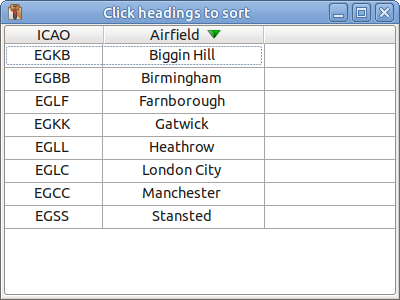
Tested using: wxPython 4.2.5 gtk3 (phoenix) wxWidgets 3.2.9 + Python 3.12.3 + Linux Mint 22.3
Thanks for doing this (and testing it), Richard. That ought to be just what I need.
Unfortunately, when I run it on my platform (as per my original post) I get:
Traceback (most recent call last):
File “R:\SimpleExample.py”, line 75, in
frame = MyFrame(None, wx.ID_ANY)
File “R:\SimpleExample.py”, line 42, in init
index = self.list_ctrl.InsertItem(sys.maxsize, icao)
wx._core.wxAssertionError: C++ assertion “info.m_itemId != -1” failed at …..\src\msw\listctrl.cpp(2001) in wxListCtrl::InsertItem(): Item ID must be set.
Rob
Perhaps windows doesn’t like being passed sys.maxsize?
A possible alternative for that for-loop:
        for key, (icao, airfield) in self.itemDataMap.items():
            self.list_ctrl.Append((icao, airfield))
            # This is needed by ColumnSorterMixin
            self.list_ctrl.SetItemData(key, key)
Bingo, Richard! That works for me. Thanks.
Having said which, a dreadful thought occurs to me: I may have been (mostly) wasting everybody’s time:
I want a virtual ListCtrl. I now guess it is NOT POSSIBLE to sort a VIRTUAL ListCtrl (this seems obvious when I think about how it might (not) work).
So what I should do is sort my data, then use RefreshItems(), along with EnsureVisible() and Focus(), as appropriate (a quick test indicated that this will work).
Duh! Why didn’t I think of it before? I suppose because I unthinkingly assumed ListCtrl would do it for me.
Maybe the moral is “When asking a question, show your code”.
I didn’t do that because it wasn’t particularly short and I didn’t want to force anyone to plough through it, to work out how it should be changed.
At least this discussion forced me to think harder about what I was trying to achieve. Sometimes just talking through your problem with others helps you see the light.
Anyway, apologies and thanks again.
Rob
Hello,
You can find a lot of examples on the wxpython wiki or on Mike Driscoll’s blog.
Here are a few:
-
How to create a list control with a SQLite database (Phoenix)
or updated:
How to use the wx.ListCtrl widget with an SQLite 3 database -
How to create a virtual list control and a SQLite database (Phoenix)
Regards
There are also quite a few limitations & operating system specific bugs with ListCtrl (like the first column icons on windows)…
There is also the UltimateListCtrl widget which is often suggested here as many of the enhanced features from the mixins are already available.
However, I’ve never used this myself but could be worth also looking through the examples to see if it fits your needs,
GabboCH