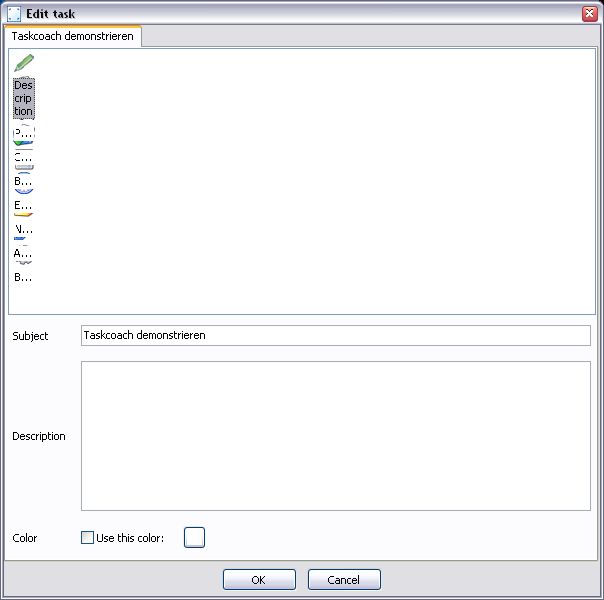
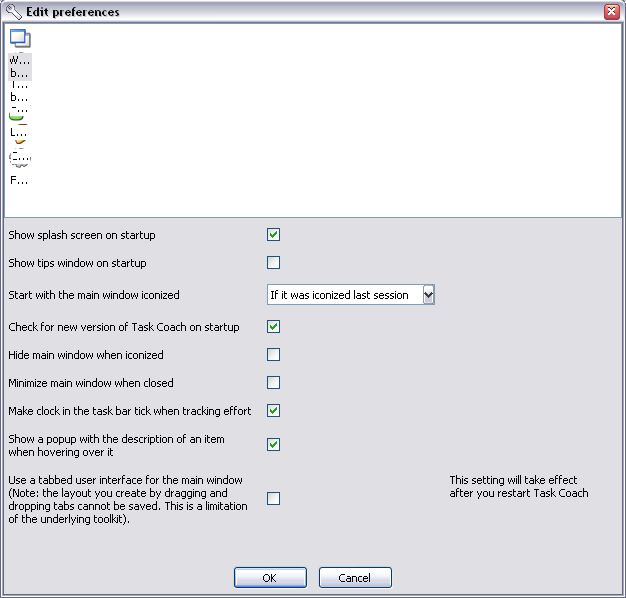
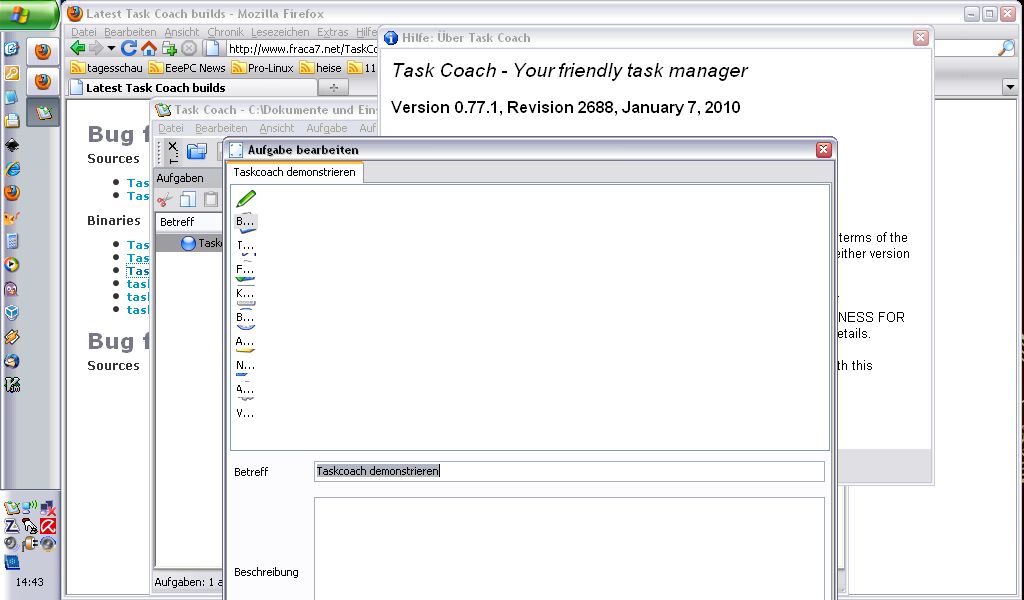
I have a user that runs Task Coach on a netbook (1024x600) running
Windows XP (German version). The icons in a horizontal Listbook are
ligned up vertically. I cannot replicate this issue on any of my own
(virtual) computers. Has anyone seen this before? Any ideas what might
be causing this?
Have you tried running at that same display resolution? There are some places in wx that will do different layout based on the screen size.
···
On 4/20/10 2:09 PM, Frank Niessink wrote:
Hi all,
I have a user that runs Task Coach on a netbook (1024x600) running
Windows XP (German version). The icons in a horizontal Listbook are
ligned up vertically. I cannot replicate this issue on any of my own
(virtual) computers. Has anyone seen this before? Any ideas what might
be causing this?
I have a user that runs Task Coach on a netbook (1024x600) running
Windows XP (German version). The icons in a horizontal Listbook are
ligned up vertically. I cannot replicate this issue on any of my own
(virtual) computers. Has anyone seen this before? Any ideas what might
be causing this?
Have you tried running at that same display resolution? There are some
places in wx that will do different layout based on the screen size.
I don't own any computer/screen that is able to run at 1024x600. I
asked the user to run at 800x600 and the problem didn't disappear.
However, if I run Task Coach on a 800x600 screen it works perfectly
normal... Any more ideas what to try that doesn't involve me buying a
netbook?
You could use a virtual machine (for example, VMWare if you've got it, or VirtualBox which is free) with the virtual display set to that screen size.
···
On 4/22/10 1:58 PM, Frank Niessink wrote:
Hi Robin,
2010/4/21 Robin Dunn<robin@alldunn.com>:
On 4/20/10 2:09 PM, Frank Niessink wrote:
I have a user that runs Task Coach on a netbook (1024x600) running
Windows XP (German version). The icons in a horizontal Listbook are
ligned up vertically. I cannot replicate this issue on any of my own
(virtual) computers. Has anyone seen this before? Any ideas what might
be causing this?
Have you tried running at that same display resolution? There are some
places in wx that will do different layout based on the screen size.
I don't own any computer/screen that is able to run at 1024x600. I
asked the user to run at 800x600 and the problem didn't disappear.
However, if I run Task Coach on a 800x600 screen it works perfectly
normal... Any more ideas what to try that doesn't involve me buying a
netbook?
I use VMWare Server, which is free too. It works for most of my
testing.
···
On Apr 22, 4:51 pm, Robin Dunn <ro...@alldunn.com> wrote:
On 4/22/10 1:58 PM, Frank Niessink wrote:
> Hi Robin,
> 2010/4/21 Robin Dunn<ro...@alldunn.com>:
>> On 4/20/10 2:09 PM, Frank Niessink wrote:
>>> I have a user that runs Task Coach on a netbook (1024x600) running
>>> Windows XP (German version). The icons in a horizontal Listbook are
>>> ligned up vertically. I cannot replicate this issue on any of my own
>>> (virtual) computers. Has anyone seen this before? Any ideas what might
>>> be causing this?
>> Have you tried running at that same display resolution? There are some
>> places in wx that will do different layout based on the screen size.
> I don't own any computer/screen that is able to run at 1024x600. I
> asked the user to run at 800x600 and the problem didn't disappear.
> However, if I run Task Coach on a 800x600 screen it works perfectly
> normal... Any more ideas what to try that doesn't involve me buying a
> netbook?
You could use a virtual machine (for example, VMWare if you've got it,
or VirtualBox which is free) with the virtual display set to that screen
size.
--
Robin Dunn
Software Craftsmanhttp://wxPython.org
I have a Sun VirtualBox running Windows XP, but 1024x600 is not in the
list of modi supported by the VirtualBox Graphics Adapter. I can't
find a setting to force a specific display size. Am I missing
something?
Thanks, Frank
···
2010/4/22 Robin Dunn <robin@alldunn.com>:
You could use a virtual machine (for example, VMWare if you've got it, or
VirtualBox which is free) with the virtual display set to that screen size.
Sorry, I thought it would allow you to resize the window to any size like VMWare does.
···
On 4/23/10 12:06 PM, Frank Niessink wrote:
2010/4/22 Robin Dunn<robin@alldunn.com>:
You could use a virtual machine (for example, VMWare if you've got it, or
VirtualBox which is free) with the virtual display set to that screen size.
I have a Sun VirtualBox running Windows XP, but 1024x600 is not in the
list of modi supported by the VirtualBox Graphics Adapter. I can't
find a setting to force a specific display size. Am I missing
something?
Hope I'm not stating the obvious, but it looks like your icons are being
sized so they can fit in the space available to them in their parent
container?
Could you have some code somewhere that attempts to scale content in
this scenario?
For debugging purposes could you jam enough icons into your application
when its running in a standard display mode to re-create a situation
where you have more icons than can fit in the vertically allotted space?
This might reproduce the conditions that you're setting on your
vertically challenged netbook displays?
It does with Linux guests. It automagically changes the guest resolution whenever I resize the window. Dynamic/automatic resizing is part of Guest Additions, which has to be installed (in the guest), after the initial install. I don’t know whether or not they support this for Windows guests, but their forums are very helpful.
Patrick
···
On Fri, Apr 23, 2010 at 5:25 PM, Frank Niessink frank@niessink.com wrote:
Unless I’m missing something VirtualBox does not seem to support this.
Hope I'm not stating the obvious, but it looks like your icons are being
sized so they can fit in the space available to them in their parent
container?
I'm not sure I follow you. The icons are in a ListBook. I think the
Listbook uses a ListCtrl in icon mode to show the icons. Something is
apparently triggering the Listbook to show the icons in one column
instead of one row. Are you suggesting that lack of horizontal space
might be that trigger?
Could you have some code somewhere that attempts to scale content in
this scenario?
No, the icons in the listbook are not explicitly manipulated.
For debugging purposes could you jam enough icons into your application
when its running in a standard display mode to re-create a situation
where you have more icons than can fit in the vertically allotted space?
This might reproduce the conditions that you're setting on your
vertically challenged netbook displays?
When the listbook doesn't have enough horizontal space to display all
icons, a scrollbar appears.
I was missing something. When the "Guest Additions" are installed on
the VirtualBox it is possible to simply resize the guest display to
any resolution. However, changing the resolution to 1024x600 doesn't
give me the issue on the VirtualBox; Task Coach runs fine with that
resolution.
Cheers, Frank
···
2010/4/23 Frank Niessink <frank@niessink.com>:
2010/4/23 Robin Dunn <robin@alldunn.com>:
Sorry, I thought it would allow you to resize the window to any size like
VMWare does.
Unless I'm missing something VirtualBox does not seem to support this.
It was a good suggestion though.
Patrick, thanks. I had just found that out on my own. See other message.
Thanks, Frank
···
2010/4/23 Patrick Tisdale <patrick.tisdale@gmail.com>:
On Fri, Apr 23, 2010 at 5:25 PM, Frank Niessink <frank@niessink.com> wrote:
Unless I'm missing something VirtualBox does not seem to support this.
It was a good suggestion though.
It does with Linux guests. It automagically changes the guest resolution
whenever I resize the window. Dynamic/automatic resizing is part of Guest
Additions, which has to be installed (in the guest), after the initial
install. I don't know whether or not they support this for Windows guests,
but their forums are very helpful.