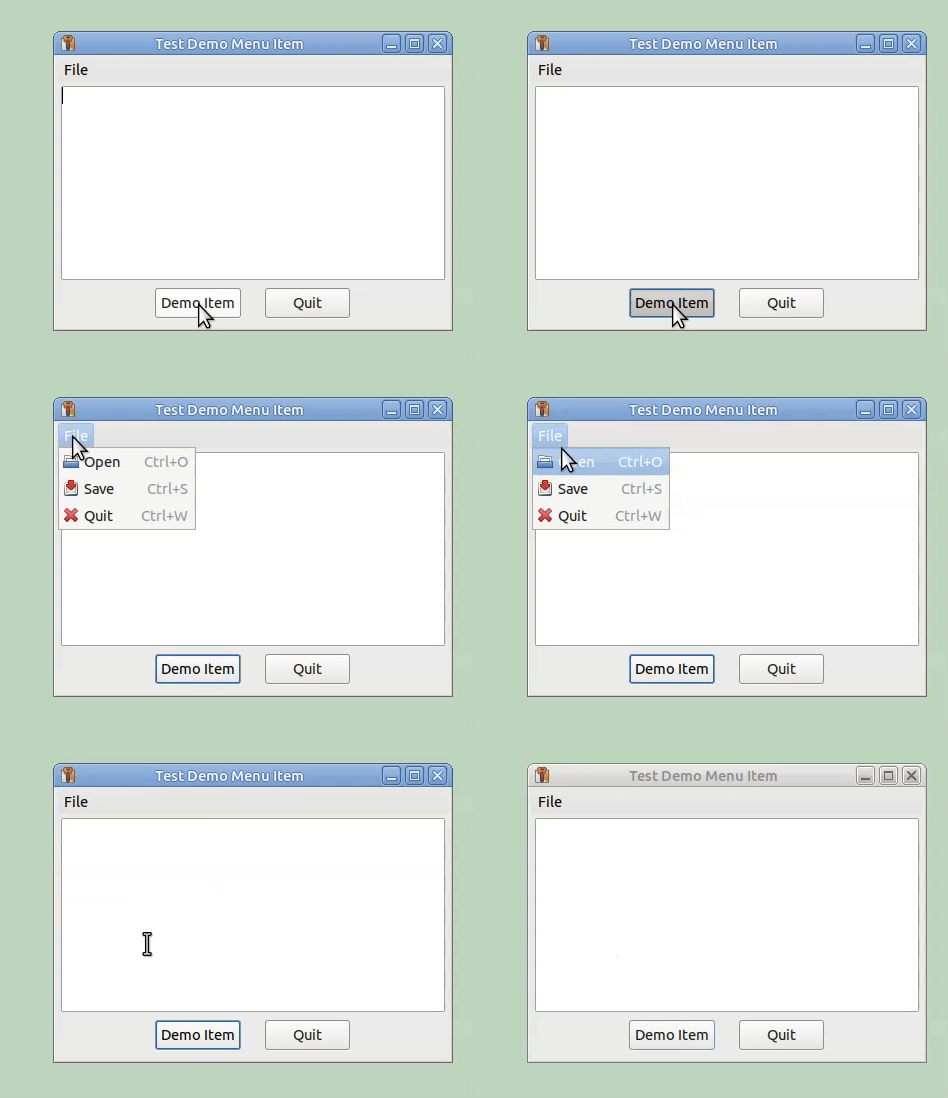
Perhaps once you have opened the first menu, you could simulate arrow-key presses to navigate through the rest of the menus and items:
import wx
from time import sleep

class MyFrame(wx.Frame):
    def __init__(self):
        wx.Frame.__init__(self, None, -1, "Test Demo Menu Item")
        self.SetSize((400, 300))

        self.menubar = wx.MenuBar()
        self.file_menu = wx.Menu()
        self.file_menu.Append(wx.ID_OPEN, "Open", "")
        self.file_menu.Append(wx.ID_SAVE, "Save", "")
        self.file_menu.Append(wx.ID_CLOSE, "Quit", "")
        self.menubar.Append(self.file_menu, "File")
        self.SetMenuBar(self.menubar)

        self.main_panel = wx.Panel(self, wx.ID_ANY)
        main_sizer = wx.BoxSizer(wx.VERTICAL)
        self.text_ctrl = wx.TextCtrl(self.main_panel, wx.ID_ANY, "", style=wx.TE_MULTILINE)
        main_sizer.Add(self.text_ctrl, 1, wx.EXPAND | wx.LEFT | wx.RIGHT | wx.TOP, 4)
        bottom_sizer = wx.BoxSizer(wx.HORIZONTAL)
        main_sizer.Add(bottom_sizer, 0, wx.ALIGN_CENTER_HORIZONTAL | wx.BOTTOM | wx.TOP, 8)
        self.demo_item_button = wx.Button(self.main_panel, wx.ID_ANY, "Demo Item")
        bottom_sizer.Add(self.demo_item_button, 0, wx.RIGHT, 24)
        self.quit_button = wx.Button(self.main_panel, wx.ID_ANY, "Quit")
        bottom_sizer.Add(self.quit_button, 0, 0, 0)
        self.main_panel.SetSizer(main_sizer)
        self.Layout()

        self.demo_item_button.Bind(wx.EVT_BUTTON, self.OnDemoItem)
        self.quit_button.Bind(wx.EVT_BUTTON, self.OnQuit)


    def OnQuit(self, _evt):
        self.Destroy()

    def OnDemoItem(self, _evt):
        sim = wx.UIActionSimulator()

        # Estimate offset of 'File' menu in the frame
        pos = self.GetPosition() + wx.Point(20, 40)
        sleep(0.5)
        sim.MouseMove(pos)
        sleep(0.5)
        sim.MouseClick(wx.MOUSE_BTN_LEFT)
        sleep(0.5)
        # Simulate down arrow key to move to Save option
        for i in range(2):
            sim.KeyDown(wx.WXK_DOWN)
            sim.KeyUp(wx.WXK_DOWN)
            wx.Yield()
            sleep(0.5)
        sleep(2)
        sim.MouseMove(pos)
        sim.MouseClick(wx.MOUSE_BTN_LEFT)


if __name__ == "__main__":
    app = wx.App()
    frame = MyFrame()
    frame.Show()
    app.MainLoop()
Edit: slightly more complex example:
import wx
from time import sleep

class MyFrame(wx.Frame):
    def __init__(self):
        wx.Frame.__init__(self, None, -1, "Test Demo Menu Item")
        self.SetSize((400, 300))

        self.menubar = wx.MenuBar()
        tmp_menu = wx.Menu()
        tmp_menu.Append(wx.ID_OPEN, "Open", "")
        tmp_menu.Append(wx.ID_SAVE, "Save", "")
        tmp_menu.Append(wx.ID_CLOSE, "Quit", "")
        self.menubar.Append(tmp_menu, "File")
        tmp_menu = wx.Menu()
        for i in range(5):
            tmp_menu.Append(wx.ID_ANY, f"Item {i+1}", "")
        self.menubar.Append(tmp_menu, "Other")
        self.SetMenuBar(self.menubar)

        self.main_panel = wx.Panel(self, wx.ID_ANY)
        main_sizer = wx.BoxSizer(wx.VERTICAL)
        self.text_ctrl = wx.TextCtrl(self.main_panel, wx.ID_ANY, "", style=wx.TE_MULTILINE)
        main_sizer.Add(self.text_ctrl, 1, wx.EXPAND | wx.LEFT | wx.RIGHT | wx.TOP, 4)
        bottom_sizer = wx.BoxSizer(wx.HORIZONTAL)
        main_sizer.Add(bottom_sizer, 0, wx.ALIGN_CENTER_HORIZONTAL | wx.BOTTOM | wx.TOP, 8)
        self.demo_item_button = wx.Button(self.main_panel, wx.ID_ANY, "Demo Item")
        bottom_sizer.Add(self.demo_item_button, 0, wx.RIGHT, 24)
        self.quit_button = wx.Button(self.main_panel, wx.ID_ANY, "Quit")
        bottom_sizer.Add(self.quit_button, 0, 0, 0)
        self.main_panel.SetSizer(main_sizer)
        self.Layout()

        self.demo_item_button.Bind(wx.EVT_BUTTON, self.OnDemoItem)
        self.quit_button.Bind(wx.EVT_BUTTON, self.OnQuit)
        self.sim = wx.UIActionSimulator()

    def multiKeyStroke(self, keycode, count):
        for i in range(count):
            self.sim.Char(keycode)
            wx.Yield()

    def OnQuit(self, _evt):
        self.Destroy()

    def OnDemoItem(self, _evt):
        # Estimate offset of 'File' menu in the frame
        pos = self.GetPosition() + wx.Point(20, 40)
        sleep(0.5)
        self.sim.MouseMove(pos)
        sleep(0.5)
        self.sim.MouseClick(wx.MOUSE_BTN_LEFT)
        sleep(0.5)

        # Navigate to fourth item in second menu
        self.multiKeyStroke(wx.WXK_DOWN, 1)
        self.multiKeyStroke(wx.WXK_RIGHT, 1)
        self.multiKeyStroke(wx.WXK_DOWN, 3)

        sleep(3)

        # Close menu
        self.multiKeyStroke(wx.WXK_ESCAPE, 1)


if __name__ == "__main__":
    app = wx.App()
    frame = MyFrame()
    frame.Show()
    app.MainLoop()
EDIT: if you give the top level menu mnemonics, you can activate them by simulating the corresponding key presses:
import wx
from time import sleep

class MyFrame(wx.Frame):
    def __init__(self):
        wx.Frame.__init__(self, None, -1, "Test Demo Menu Item")
        self.SetSize((400, 300))

        self.menubar = wx.MenuBar()
        tmp_menu = wx.Menu()
        tmp_menu.Append(wx.ID_OPEN, "Open", "")
        tmp_menu.Append(wx.ID_SAVE, "Save", "")
        tmp_menu.Append(wx.ID_CLOSE, "Quit", "")
        self.menubar.Append(tmp_menu, "&File")
        tmp_menu = wx.Menu()
        for i in range(5):
            tmp_menu.Append(wx.ID_ANY, f"Item {i+1}", "")
        self.menubar.Append(tmp_menu, "&Other")
        self.SetMenuBar(self.menubar)

        self.main_panel = wx.Panel(self, wx.ID_ANY)
        main_sizer = wx.BoxSizer(wx.VERTICAL)
        self.text_ctrl = wx.TextCtrl(self.main_panel, wx.ID_ANY, "", style=wx.TE_MULTILINE)
        main_sizer.Add(self.text_ctrl, 1, wx.EXPAND | wx.LEFT | wx.RIGHT | wx.TOP, 4)
        bottom_sizer = wx.BoxSizer(wx.HORIZONTAL)
        main_sizer.Add(bottom_sizer, 0, wx.ALIGN_CENTER_HORIZONTAL | wx.BOTTOM | wx.TOP, 8)
        self.demo_item_button = wx.Button(self.main_panel, wx.ID_ANY, "Demo Item")
        bottom_sizer.Add(self.demo_item_button, 0, wx.RIGHT, 24)
        self.quit_button = wx.Button(self.main_panel, wx.ID_ANY, "Quit")
        bottom_sizer.Add(self.quit_button, 0, 0, 0)
        self.main_panel.SetSizer(main_sizer)
        self.Layout()

        self.demo_item_button.Bind(wx.EVT_BUTTON, self.OnDemoItem)
        self.quit_button.Bind(wx.EVT_BUTTON, self.OnQuit)
        self.sim = wx.UIActionSimulator()

    def multiKeyStroke(self, keycode, count):
        for i in range(count):
            self.sim.Char(keycode)
            wx.Yield()

    def OnQuit(self, _evt):
        self.Destroy()

    def OnDemoItem(self, _evt):
        # Simulate mnemonic key for 'Other' menu
        self.sim.Char(ord('O'), wx.MOD_ALT)

        # Navigate to menu's fourth item
        self.multiKeyStroke(wx.WXK_DOWN, 3)

        sleep(3)

        # Close menu
        self.multiKeyStroke(wx.WXK_ESCAPE, 1)


if __name__ == "__main__":
    app = wx.App()
    frame = MyFrame()
    frame.Show()
    app.MainLoop()