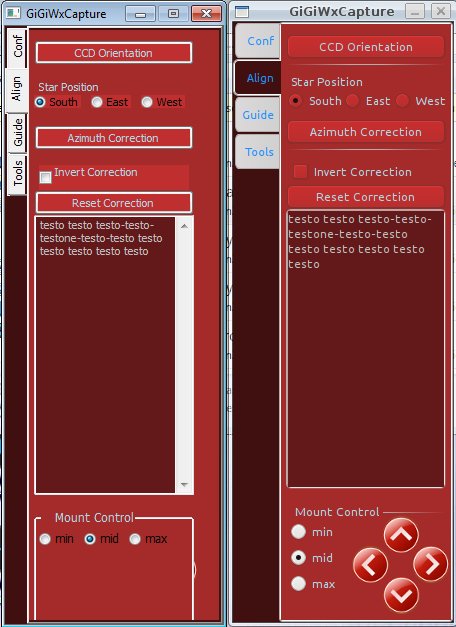
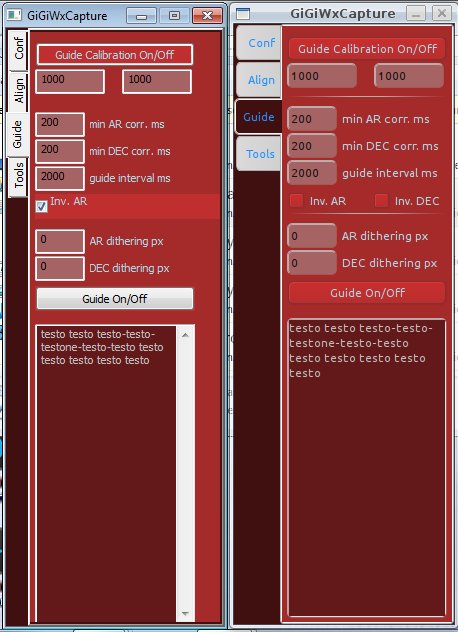
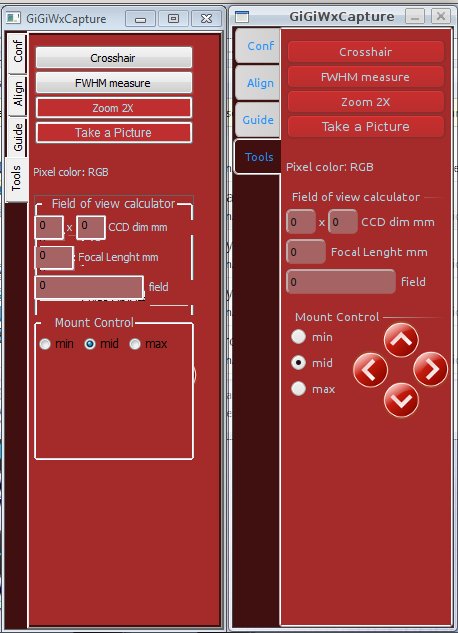
- background color of the buttons seems to be not well supported under
windows -> NO update
- background color of the togglebuttons seems to be not supported at
all under windows -> NO update
- there is some issue with radiobox elements position: different
interpretation under windows? -> SOLVED - for crossplatform
programming with radiobutton is important to specify wxRA_SPECIFY_COLS
or wxRA_SPECIFY_ROWS; the two "dimension" attribute you can set with
xrced have a platform-depending interpretation, I think.
- foreground bmp results not foreground under windows -> SOLVED - in
linux, images seem to be always foreground; in windows is important
the order in xrc file.
- NEW I cannot get rid of border for wxradiobox and wxstaticbox on
windows
···
On 6 Mar, 12:11, andrea console <andreacons...@gmail.com> wrote:
From the same xrc file, that I attach, I have very different behaviour on
windows and linux.
As you can see from the screenshots (windows on left) I see 4 main
problems:
- background color of the buttons seems to be not well supported under
windows
- background color of the togglebuttons seems to be not supported at all
under windows
- there is some issue with radiobutton position: different interpretation
under windows?
- foreground bmp results not foreground under windows
While trying to solve them by myself, if you have any suggestions please
tell me.
From the same xrc file, that I attach, I have very different behaviour
on windows and linux.
As you can see from the screenshots (windows on left) I see 4 main
problems:
- background color of the buttons seems to be not well supported under
windows
- background color of the togglebuttons seems to be not supported at all
under windows
Support of non-standard colors on Windows is a wx hack that is added on to the native control. The native buttons do not support it at all. That said, the wx hack is a bit better in 2.9 and since the button classes have been reorganized such that they are all using the same base classes then the hack should work with all native button classes. In the meantime you should probably use the generic buttons in wx.lib.buttons if you really need the non-standard colors.
- there is some issue with radiobutton position: different
interpretation under windows?
IIRC there were differences in the default style parameters for the different platforms, but if you explicitly specified the style then the behaviors would be consistent. I'm not sure if this carried over to using the wx.RadioButtonBox from XRC.
- foreground bmp results not foreground under windows
Do you mean wx.StaticBitmap? On GTK the bmp is just drawn directly on the parent like other static controls, so the z-order of the widgets doesn't always matter much. On Windows it is a complete and independent window control and so z-order and other low level window attributes do affect it, and in most cases the behavior of overlapping sibling controls is undefined in wx.
- NEW I cannot get rid of border for wxradiobox and wxstaticbox on
windows
You're not supposed to be able to. If you don't want the boxes then don't use the box widgets.
- background color of the buttons seems to be not well supported under
windows -> NO update
- background color of the togglebuttons seems to be not supported at
all under windows -> NO update
Remember that, unlike some other frameworks, wx tries to use the
underlying native widgets wherever possible. Each of the operating
systems has "quirks" in their native widgets. To get a truly
cross-platform solution, you either have to deal with finding the
"lowest common denominator", or you throw out the native widgets and
write your own custom-drawn widgets.
···
--
Tim Roberts, timr@probo.com
Providenza & Boekelheide, Inc.
> - background color of the buttons seems to be not well supported under
> windows
> - background color of the togglebuttons seems to be not supported at all
> under windows
...
In
the meantime you should probably use the generic buttons in
wx.lib.buttons if you really need the non-standard colors.
Can you suggest the better documentation online to understand this
approach?
> - there is some issue with radiobutton position: different
> interpretation under windows?
...
I'm not sure if this carried over to
using the wx.RadioButtonBox from XRC.
You are right: I solved by looking at wx.RadioButtonBox documentation.
However XRCed interface seems misleading in this occasion.
> - foreground bmp results not foreground under windows
I solved by altering order in XRC file. It works now
> - NEW I cannot get rid of border for wxradiobox and wxstaticbox on
> windows
You're not supposed to be able to. If you don't want the boxes then
don't use the box widgets.
You are right, but I think that the fact that I can do it under linux
is a bit misleading.
The design goal of wx is for apps to look native on all platforms, rather than the same on all platforms, so different platforms will have different ways to represent the concept of a group of controls, or "Box" of controls.
If you want it to look the same across platforms, you may be better off with a different toolkit!
-Chris
···
On 3/8/11 1:10 AM, andreaconsole wrote:
- NEW I cannot get rid of border for wxradiobox and wxstaticbox on
windows
You're not supposed to be able to. If you don't want the boxes then
don't use the box widgets.
You are right, but I think that the fact that I can do it under linux
is a bit misleading.
--
Christopher Barker, Ph.D.
Oceanographer
Emergency Response Division
NOAA/NOS/OR&R (206) 526-6959 voice
7600 Sand Point Way NE (206) 526-6329 fax
Seattle, WA 98115 (206) 526-6317 main reception
Just use one or more of the button classes in wx.lib.buttons in place of the wx.Button and other classes you are already using. If the generic buttons do not quite meet your needs then it is not hard to derive your own classes from them and override things like the drawing of the label, the drawing of the bezel, etc. You can see an example of them in action in the demo.
···
On 3/8/11 1:10 AM, andreaconsole wrote:
Thank you Robin,
- background color of the buttons seems to be not well supported under
windows
- background color of the togglebuttons seems to be not supported at all
under windows
...
In
the meantime you should probably use the generic buttons in
wx.lib.buttons if you really need the non-standard colors.
Can you suggest the better documentation online to understand this
approach?
I think I must give up the flexibility of XRCed and XRC files in that
way. Correct?
···
On 8 Mar, 19:52, Robin Dunn <ro...@alldunn.com> wrote:
On 3/8/11 1:10 AM, andreaconsole wrote:
> Thank you Robin,
>>> - background color of the buttons seems to be not well supported under
>>> windows
>>> - background color of the togglebuttons seems to be not supported at all
>>> under windows
> ...
>> In
>> the meantime you should probably use the generic buttons in
>> wx.lib.buttons if you really need the non-standard colors.
> Can you suggest the better documentation online to understand this
> approach?
Just use one or more of the button classes in wx.lib.buttons in place of
the wx.Button and other classes you are already using. If the generic
buttons do not quite meet your needs then it is not hard to derive your
own classes from them and override things like the drawing of the label,
the drawing of the bezel, etc. You can see an example of them in action
in the demo.
--
Robin Dunn
Software Craftsmanhttp://wxPython.org
I understand your point of view, I just think that design tools like
XRCed should specify if any property is available only on some
specific platform, and not simply expect the user to guess it.
···
On 8 Mar, 18:51, Christopher Barker <Chris.Bar...@noaa.gov> wrote:
On 3/8/11 1:10 AM, andreaconsole wrote:
>>> - NEW I cannot get rid of border for wxradiobox and wxstaticbox on
>>> windows
>> You're not supposed to be able to. If you don't want the boxes then
>> don't use the box widgets.
> You are right, but I think that the fact that I can do it under linux
> is a bit misleading.
The design goal of wx is for apps to look native on all platforms,
rather than the same on all platforms, so different platforms will have
different ways to represent the concept of a group of controls, or "Box"
of controls.
If you want it to look the same across platforms, you may be better off
with a different toolkit!
-Chris
--
Christopher Barker, Ph.D.
Oceanographer
Emergency Response Division
NOAA/NOS/OR&R (206) 526-6959 voice
7600 Sand Point Way NE (206) 526-6329 fax
Seattle, WA 98115 (206) 526-6317 main reception
Though I would say it's not for the user to guess -- it's for the user to test.
cross platform trade-offs are not obvious. If one platform has a "static box" that allows you to show or not show the outline of the box, but another platform doesn't, should wx expose that functionality on the platform that does?
Anyway, it sounds like you are getting there.
-Chris
···
On 3/9/11 3:10 AM, andreaconsole wrote:
I understand your point of view, I just think that design tools like
XRCed should specify if any property is available only on some
specific platform, and not simply expect the user to guess it.
--
Christopher Barker, Ph.D.
Oceanographer
Emergency Response Division
NOAA/NOS/OR&R (206) 526-6959 voice
7600 Sand Point Way NE (206) 526-6329 fax
Seattle, WA 98115 (206) 526-6317 main reception
so, absolutely no way to have coloured togglebuttons under Windows
using XRC files? I have to chose between standard buttons and XRC?
···
On 9 Mar, 19:09, Christopher Barker <Chris.Bar...@noaa.gov> wrote:
On 3/9/11 3:10 AM, andreaconsole wrote:
> I understand your point of view, I just think that design tools like
> XRCed should specify if any property is available only on some
> specific platform, and not simply expect the user to guess it.
That would be a feature request for XRCed.
Though I would say it's not for the user to guess -- it's for the user
to test.
cross platform trade-offs are not obvious. If one platform has a "static
box" that allows you to show or not show the outline of the box, but
another platform doesn't, should wx expose that functionality on the
platform that does?
It's not super simple, but you can use custom widgets with XRC. You can either add a resource handler class that XRC will use when parsing and building the UI elements, or use XRC's subclass attribute. There are some examples of each in the demo. XRCed is also able to deal with custom handlers (via plugins) or subclassed items (right click on an item in the tree and select subclass.)
···
On 3/9/11 2:59 AM, andreaconsole wrote:
I think I must give up the flexibility of XRCed and XRC files in that
way. Correct?
Good news. Now, since I'm a beginner of OOP, I must understand how
exactly do this subclassing.
I read this: TwoStageCreation - wxPyWiki
and this: http://wiki.wxpython.org/index.cgi/XRCed
but it seems very difficult.
First question:
I have to derive from wx.lib.button or from wx.button?
Can I do something like "class MyRedButton(wx.Button):" and class
"MyRedToggleButton(wx.ToggleButton):" where I set background color to
red?
I also looked the demo xmlResourceSubclass but I didn't understand a
lot...
I think it would be simpler to use "Generic Buttons", but again I
don't know how to call them from XRCed
···
On 10 Mar, 20:03, Robin Dunn <ro...@alldunn.com> wrote:
On 3/9/11 2:59 AM, andreaconsole wrote:
> I think I must give up the flexibility of XRCed and XRC files in that
> way. Correct?
It's not super simple, but you can use custom widgets with XRC. You can
either add a resource handler class that XRC will use when parsing and
building the UI elements, or use XRC's subclass attribute. There are
some examples of each in the demo. XRCed is also able to deal with
custom handlers (via plugins) or subclassed items (right click on an
item in the tree and select subclass.)
--
Robin Dunn
Software Craftsmanhttp://wxPython.org
I think I must give up the flexibility of XRCed and XRC files in that
way. Correct?
It's not super simple, but you can use custom widgets with XRC. You can
either add a resource handler class that XRC will use when parsing and
building the UI elements, or use XRC's subclass attribute. There are
some examples of each in the demo. XRCed is also able to deal with
custom handlers (via plugins) or subclassed items (right click on an
item in the tree and select subclass.)
--
Robin Dunn
Software Craftsmanhttp://wxPython.org
Good news. Now, since I'm a beginner of OOP, I must understand how
exactly do this subclassing.
I read this: TwoStageCreation - wxPyWiki
and this: http://wiki.wxpython.org/index.cgi/XRCed
but it seems very difficult.
First question:
I have to derive from wx.lib.button or from wx.button?
To use the subclass attribute the class must actually be a subclass of the object type specified in the XRC.
Can I do something like "class MyRedButton(wx.Button):" and class
"MyRedToggleButton(wx.ToggleButton):" where I set background color to
red?
That won't be any different than what you were already doing. You'll still have a native button with the color changed, and it will have the same drawing glitches as before.
I also looked the demo xmlResourceSubclass but I didn't understand a
lot...
I think it would be simpler to use "Generic Buttons", but again I
don't know how to call them from XRCed
Since the generic button classes do not derive from an existing widget control type that XRC already supports you'll need to derive a new class from XmlResourceHandler that XRC can use to create instances of the button. There is an example of this in the demo.
For making it usable by XRCed you can make a XRCed plugin for it. I've never done this myself so I don't know the details, but I would probably use the stuff for LEDNumberCtrl in the *gizmos.* files in XRCed's plugins folder as a starting point.
···
On 3/10/11 3:25 PM, andreaconsole wrote:
On 10 Mar, 20:03, Robin Dunn<ro...@alldunn.com> wrote: