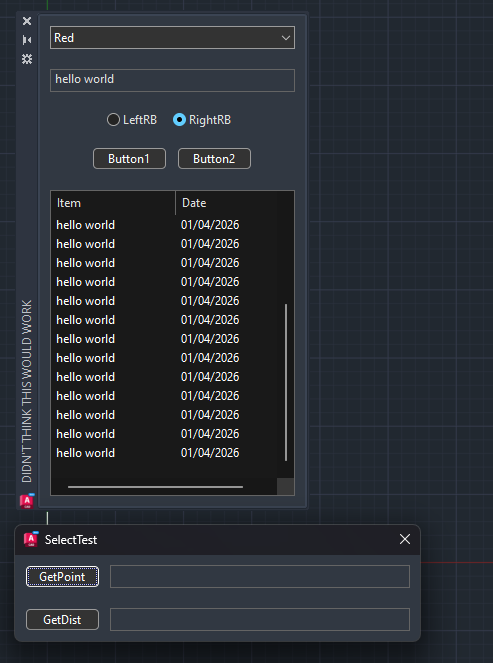
If anyone would like to test these scripts on their system and let me know if they work, I would be very grateful (please provide me with the following information: wxPython, wxWidgets, operating system version, etc.).
Also, like many other users, I would like to see an example of using dark mode as soon as possible to begin various tests.
@Zig_Zag you may want to read the wxWidgets documentation for now until wxPython documentation is updated. Note the MSW specifics there about IsDark().
After consulting the wxWidgets documentation and making a modification for Linux, I tried to enable dark mode on Windows with “w**xpython-4.3.0a16030”, unfortunately without success.
Preferably, I don’t want to use any external packages. As for the best practice for enabling dark mode on Windows, I’ll simply wait until everything is finalized and, if possible, for a concrete example of its use with wxPython. Sorry if I’m being impatient
Preferably, I don’t want to use any external packages
Do you mean “I don’t want to use any external packages except for the very large and complex external package called wxPython which is the focus of this discussion forum”?
darkdetect is pure python with minimal external dependencies (None on Window/Linux, 1 optional one on Mac), and is independent of the GUI toolkit.
My suggestion here is that wxPython add it as a dependency and use it, or (worse) simply borrow the code (BSD licensed).
As for the best practice for enabling dark mode on Windows, I’ll simply wait until everything is finalized and, if possible, for a concrete example of its use with wxPython.
Over at wxutils (GitHub - newville/wxutils: wxPython utilities and convenience functions · GitHub) (yes, an external package, so you may not be interested), I recently added darkdetect as a dependency and use it to set many colors by “logical name” (‘text’, ‘text_bg’, etc) that will have different values in Light and Dark mode. It also uses darkdetect 'listener" to run a daemon thread to run registered callbacks when the System mode changes. That means the widgets not only get usable colors when an App starts, but they change when the System mode changes. These changes are fairly new, and there may be a some issues, but the results are readable and don’t give dark text on a dark background or light text on a light background. That may be of interest to some readers here.
This is now used in the latest version of wxmplot (again, an external package and with its own external dependencies including matplotlib which you would probably not want to use, but that others might find useful), and in several downstream applications that I support. Some of these have somewhat complex GUI components and context-sensitive text colors, say using validators to color-code invalid values or warning levels. These are working well at both respecting the System mode at startup and adapting when that mode changes.
How would this effect embedded projects where dark/light mode is set in the host application through wxWidgets?
I don’t know. It’s possible that I don’t understand the question. By “embedded”, do you mean an
application that owns the whole windowing system? If so, then I definitely have no idea.
Can wxPython set change dark/light mode?
By “embedded”, do you mean an application that owns the whole windowing system?
Right, my project embeds wxWidgets/wxPython inside AutoCAD. AutoCAD has its own dark/light mode independent of the OS. The plan is to call wxTheApp->MSWEnableDarkMode based on AutoCAD’s color theme. I’ve been testing a bit here GitHub - CEXT-Dan/WxArx: Example using wxWidgets with AutoCAD's ObjectARX · GitHub. I assume python users will be able to control this, as wxTheApp and wx.App.Get() are pointing to the same instance.
isDark is ambiguous, is wxWidgets currently set in dark mode, is the OS in dark mode? So it’s clear, I’m not against this, just asking
‘darkdetect’ is meant to report the system setting, and is not reliant (or intended specifically) a particular GUI toolkit.
For Linux, darkdetect seems to assume that “gitk-theme” is the reliable source of this information. I believe he original posting here, and as I have seen myself in some situations on Linux, “gtk-theme” can be different from wx.SystemSetting.GetAppearance().IsDark(). I don’t know enough about the details to know what is different.
I see, so it seems there could be a conflict if I use wxTheApp->MSWEnableDarkMode, and the Python client uses wxSystemSettings::GetAppearance(), there should be a wxApp::GetAppearance()
It’s likely I’ll need to roll my own, something like Ap.Application.GetAppearance()
I’m waiting on a new snapshot to test, wxpython-4.3.0a16032 binaries are missing
virtual void __cdecl wxAppBase::DoDelayedCleanup(void)