I saw a C++ version of this for wxWindows...I'm trying the following code in
wxPython, but the event never fires. Can I not do this with wxPython, or am
I forgetting something?
···
----------------------------------------
from wxPython.wx import *
You shouldn't use the EVT_LEFT_UP binding and a Connect. Plus, there is no
need to subclass wxStaticBitmap. Here's a complete program, just substitute
your own image.
I saw a C++ version of this for wxWindows...I'm trying the
following code in
wxPython, but the event never fires. Can I not do this with
wxPython, or am
I forgetting something?
----------------------------------------
from wxPython.wx import *
Interesting. I was hoping to have a reusable control I could just drop in
wherever I needed it, but perhaps I can make something like this work as
well. If anyone happens to have a self contained way of doing this, I'd be
interested in seeing it.
Thanks.
-D
···
On Monday 04 November 2002 5:26 pm, Kevin Altis wrote:
You shouldn't use the EVT_LEFT_UP binding and a Connect. Plus, there is no
need to subclass wxStaticBitmap. Here's a complete program, just substitute
your own image.
Okay, I didn't know that is what you wanted. In that case, go ahead and
subclass wxStaticBitmap and bind EVT_LEFT_UP to a method in the subclass.
ka
···
-----Original Message-----
From: Dave Kelly [mailto:dkelly@inav.net]
Sent: Monday, November 04, 2002 3:51 PM
To: wxPython-users@lists.wxwindows.org
Subject: Re: [wxPython-users] Clickable wxStaticBitmap?
On Monday 04 November 2002 5:26 pm, Kevin Altis wrote:
> You shouldn't use the EVT_LEFT_UP binding and a Connect. Plus,
there is no
> need to subclass wxStaticBitmap. Here's a complete program,
just substitute
> your own image.
>
> from wxPython import wx
>
> class MyApp(wx.wxApp):
>
> def OnInit(self):
> frame = wx.wxFrame(wx.NULL, -1, "minimal", size=(200, 200))
> panel = wx.wxPanel(frame, -1)
> frame.Show(1)
> wx.wxInitAllImageHandlers()
>
> bmp = wx.wxBitmap("trash.gif", wx.wxBITMAP_TYPE_GIF)
> self.staticBmp = wx.wxStaticBitmap(panel, -1, bmp)
> wx.EVT_LEFT_UP(self.staticBmp, self.OnMouseClick)
>
> self.SetTopWindow(frame)
> return 1
>
> def OnMouseClick(self, evt):
> print evt.GetEventObject()
>
> app = MyApp(0)
> app.MainLoop()
Interesting. I was hoping to have a reusable control I could
just drop in
wherever I needed it, but perhaps I can make something like this work as
well. If anyone happens to have a self contained way of doing
this, I'd be
interested in seeing it.
Thanks.
-D
---------------------------------------------------------------------
To unsubscribe, e-mail: wxPython-users-unsubscribe@lists.wxwindows.org
For additional commands, e-mail: wxPython-users-help@lists.wxwindows.org
I want to have a component respond to either a URL or a filename dropped onto it. I'm trying all sorts of routes to get this, and haven't gotten it working yet. Any ideas?
One path I've gone is noticing that wxURLDataObject subclasses wxDataObjectComposite. So I changed the demo MyURLDropTarget __init__ to: #self.data = wxURLDataObject(); #self.SetDataObject(self.data)
self.data = wxURLDataObject()
self.data.Add(wxFileDataObject(), true)
self.SetDataObject(self.data)
and am trying to now get data out of it with GetDataHere(), but don't know how to (or if I can) supply a 'buffer':
… in OnData:
self.data.GetDataHere(wxDataFormat(wxDF_FILENAME), ???)
I saw a C++ version of this for wxWindows...I'm trying the following code in wxPython, but the event never fires. Can I not do this with wxPython, or am I forgetting something?
Depending on the platform/version the wxStaticBitmap may or may not send the mouse events. If you need it then it would be better to make a custom control derived from wxControl that draws the bitmap in its EVT_PAINT handler. Then all mouse events should work just fine.
···
--
Robin Dunn
Software Craftsman http://wxPython.org Java give you jitters? Relax with wxPython!
I want to have a component respond to either a URL or a filename dropped onto it. I'm trying all sorts of routes to get this, and haven't gotten it working yet. Any ideas?
One path I've gone is noticing that wxURLDataObject subclasses wxDataObjectComposite. So I changed the demo MyURLDropTarget __init__ to:
and am trying to now get data out of it with GetDataHere(), but don't know how to (or if I can) supply a 'buffer':
I still have it on my todo list to figure out how to properly support GetDataHere in wxPython...
I think that for now you can work around this by keeping a reference to the wxFileDataObject and then if the dropped data is of that type then you can use its GetFilenames method...
···
--
Robin Dunn
Software Craftsman http://wxPython.org Java give you jitters? Relax with wxPython!
I have a subclass of wxPanel and I want to limit or change what mouse events it generates. Anyone have a suggestion on the best approach? Make my own event handler? Does that work?
I have a subclass of wxPanel and I want to limit or change what mouse
events it generates.
What do you want to happen when someone clicks on a button(for instance)
that is on your panel? IF you want to change that, you're out of luck. I
would argue that what you want is a subclass of button. If you only want
to mess with the mouse events from the Panel itself, Cliff's suggestion
should do it.
-Chris
···
--
Christopher Barker, Ph.D.
Oceanographer
NOAA/OR&R/HAZMAT (206) 526-6959 voice
7600 Sand Point Way NE (206) 526-6329 fax
Seattle, WA 98115 (206) 526-6317 main reception
Yeah. Sorry, I was confused I forgot that events are propogated up
from the children to the parent. I'm not sure if there is an easy way
of doing this aside from having the parent iterate through its children
and removing their event handlers for that event (and I'm not sure how
you'd do that either).
···
On Tue, 2002-12-10 at 11:40, Robb Shecter wrote:
>
>
>You could catch all mouse events by using EVT_MOUSE_EVENTS() then
>discard whatever events you don't want processed.
>
>
Hmm - you mean, catch them in the subclass itself? But other classes
can still register for the events and see them.
Events are processed once so if you capture them with EVT_MOUSE_EVENTS() in
your class that's the end of them. This is only the mouse events that are
in the class' panel.
And this is his problem: he wants to prevent mouse events from getting
to any windows that are children of the panel, but the mouse events are
only sent to the window they occurred in. So using EVT_MOUSE_EVENTS()
in the panel won't work since the child gets the event, not the parent
(panel).
···
On Tue, 2002-12-10 at 12:31, Nigel Moriarty wrote:
Command events (not mouse events) will search the GUI heirachy looking for
an event handler (a default handler or one you implement).
Nigel
----- Original Message -----
From: "Robb Shecter" <rs@onsitetech.com>
To: <wxPython-users@lists.wxwindows.org>
Sent: Tuesday, December 10, 2002 11:40 AM
Subject: Re: [wxPython-users] Preventing event generation in wxPanel
subclass?
> >
> >
> >You could catch all mouse events by using EVT_MOUSE_EVENTS() then
> >discard whatever events you don't want processed.
> >
> >
> Hmm - you mean, catch them in the subclass itself? But other classes
> can still register for the events and see them.
>
> Robb
>
>
> ---------------------------------------------------------------------
> To unsubscribe, e-mail: wxPython-users-unsubscribe@lists.wxwindows.org
> For additional commands, e-mail: wxPython-users-help@lists.wxwindows.org
>
---------------------------------------------------------------------
To unsubscribe, e-mail: wxPython-users-unsubscribe@lists.wxwindows.org
For additional commands, e-mail: wxPython-users-help@lists.wxwindows.org
It looks like what you are trying to do (if I'm understanding correctly)
is going to be very difficult or impossible. Maybe if you tell us why
you're trying to do this someone can come up with something equivalent
that will work better.
Regards,
···
On Tue, 2002-12-10 at 11:24, Robb Shecter wrote:
Hi,
I have a subclass of wxPanel and I want to limit or change what mouse
events it generates. Anyone have a suggestion on the best approach?
Make my own event handler? Does that work?
...I want the ShovableWindow to be able to register with the ImagePanel and get mouse events that correctly refer only to points on the contained static bitmap. I already have a nice mechanism for a container class like ImagePanel to get and pass on events from its child.
But I want it to ONLY pass on events from its child: One problem is that since it extends past the edge of the bitmap, it'd send mouse events which are out of range for the image tools. But if events are really only handled once (when skip is not set), then that might be my solution.
Sorry if I missed this, but is there a list of the changes? (I'm deciding whether it's worth updating.) The changes.txt online doesn't have a 2.3.3. entry.
>Maybe if you tell us why
>you're trying to do this someone can come up with something equivalent
>that will work better
>
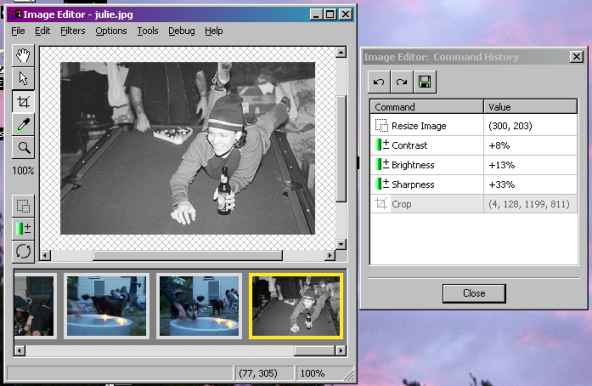
Yeah, you're right. Check out the attached screenshot. (Hmm... is
29K too big to send to a list?)
Your app looks great. One question though: what is that person doing?
In the middle of the image editor's scroll panel I've got the image in a
static bitmap which is layered in classes like this:
...I want the ShovableWindow to be able to register with the ImagePanel
and get mouse events that correctly refer only to points on the
contained static bitmap. I already have a nice mechanism for a container
class like ImagePanel to get and pass on events from its child.
But I want it to ONLY pass on events from its child: One problem is that
since it extends past the edge of the bitmap, it'd send mouse events
which are out of range for the image tools. But if events are really
only handled once (when skip is not set), then that might be my solution.
So if I understand correctly, you only want the Shovable window to
receive mouse events that occur *within* the actual image (not the
surrounding border aka the ImagePanel)?
I think what I would do in that case is capture all the mouse events in
the image and create custom events that are the equivalent of those
mouse events and post them to the parent. Then set handlers for those
custom events in the parent. Then any normal mouse events can be
ignored in the parent (or used for something else).
Does that make sense? I can work up a small demo if you like.
Your app looks great. One question though: what is that person doing?
Thanks! I've been working a lot on the UI, trying to keep it professional looking. And that's a friend of mine enjoying a nutritional dinner, Portland-style.
So if I understand correctly, you only want the Shovable window to
receive mouse events that occur *within* the actual image (not the
surrounding border aka the ImagePanel)?
Yup -
...create custom events...
Yeah, this is a route I haven't gone yet - it's probably time. I think also that my original design idea has problems; although I _do_ want to shield the containing class (ie. the scrollable window) from the ImagePanel implementation details, I think it's heavy-handed to totally disallow it to receive all ImagePanel mouse events. It could be appropriate in some unthought-of context. And so creating my own events, which would be on a higher semantic level, makes sense.
Sorry if I missed this, but is there a list of the changes? (I'm deciding whether it's worth updating.) The changes.txt online doesn't have a 2.3.3. entry.
There wasn't a 2.3.3 of wxPython because there were some changes required in wxWindows 2.3.3 before I could do my release. The same will be true of 2.3.4.
···
--
Robin Dunn
Software Craftsman http://wxPython.org Java give you jitters? Relax with wxPython!
 I forgot that events are propogated up
 Check out the attached screenshot. (Hmm... is 29K too big to send to a list?)