How do I run it? According to the instructions, to run it without installing, I should:
cd miniword
python -m miniword
But, after git clone https://codeberg.org/chrisecker/miniword.git
I see no file named “miniword” - not in the root miniword folder, not in the nested miniword/miniword.
python -m and pip are probably the standard approaches these days. Personally, I would prefer the old-school way of copying a starter script to /usr/local/bin and the library to /usr/local/lib/python — but wouldn’t that confuse users even more?
I think I’ll add an optional startup script, so both ways become possible.
Well, I’m on Windows. Just a double-click on the .py file should do the job.
I see pip installation as standard way for libraries. I don’t see the point of installing applications into site-packages or similar.
Of course, you may factor out a library. I think especially a widget with markdown support would be very useful. E.g. I have here some markdown files which were output from a chatbot. I could well imagine that there are people who would like to integrate some AI features and output into their wx applications.
Thanks, it worked. I always forget what’s that -m key is for.
Probably gonna need a separate “launcher” anyway, that could internally call python -m miniword or whatever. As I remember, using Python scripts as “executables” on Windows was rather limited and problematic.
I second the “factoring out a library” request. I sometimes needed a rich text widget, usually ended up using wx.html2.WebView, but gosh, wasn’t that ugly. The present wx.richtext.RichTextCtrl has very poor performance, outright abysmal if using tables. This MiniWord doesn’t seem to have that problem (although I can’t say I’ve tested it extensively). Would be nice to have something usable that doesn’t require using html, css and javascript along with Python. Even without direct markdown support.
Seems impossible to input in languages other than English (or perhaps the default system input language, whatever that is). I’ve tried on Linux, with Russian and Japanese.
Seems impossible to input in languages other than English (or perhaps the default system input language, whatever that is). I’ve tried on Linux, with Russian and Japanese.
I made some changes and this should work now. Since I only have german keyboards - could you please confirm that it is ok?
No luck - after a git pull I ran it again with python3 -m miniword (no “installation”) and saw no changes regarding multilingual input.
I was able to fix that with the following changes to the on_char function of the wxtextview.py file:
def on_char(self, event):
    keycode = event.GetKeyCode() # 0 for non-ASCII characters
    ukey = event.GetUnicodeKey()  # equal to keycode for ASCII characters
    ctrl = event.ControlDown()
    shift = event.ShiftDown()
    alt = event.AltDown()
    action = self.actions.get((keycode, ctrl, alt))
    if action is None:
        # NOTE: there seems to be a bug in wx - AltGr also
        # triggers Ctrl!
        if (keycode == ukey) and ((ctrl and not alt) or keycode < 32):
            return event.Skip()  # needed for menu
        action = chr(ukey if ukey != wx.WXK_NONE else keycode)
    self.handle_action(action, shift)
Could input Russian without a problem, Japanese was displayed improperly (empty rectangles instead of characters), but that’s probably just a font issue. Not sure if this doesn’t break anything else in the code, let alone if it’s optimal, I tried changing as little as possible. Maybe it would make more sense to just use GetUnicodeKey() everywhere, except when it returns WXK_NONE.
It’s not a bug - it’s a feature and it’s probably not related to wx.
See wx.KeyboardState — wxPython Phoenix 4.2.3 documentation
“… European keyboard layout where AltGr key which is seen by the program as combination of CTRL and ALT is used…”
Thanks. I could not test the markdown support, though.
Still missing:
drag & drop
how to install the plugins? Why install at all? Why is there not just a directory “plugins”? (There is no directory “C:\Users.…\AppData\Roaming\miniword”.) Alternatively let the user specify a folder.
IMHO the most important “feature” for GUI applications is usability. Nobody reads the manuals, so it should be able to use the basic features without manual. Just run the application and look around. If the user fails to use the application at that point already, then he/she will not come back.
Currently, it cannot display text in many languages, and that doesn’t seem to be a simple issue of choosing a proper font, as I previously thought. Shows English without a problem, many others with Latin-based scripts (French, Spanish, even Turkish seems OK, but some Vietnamese characters turn to rectangles). Shows Russian without a problem, but not some other Cyrillic-based scripts (say, Kazakh). Displays Greek, but not Armenian. Doesn’t display Japanese, Chinese, Korean, Arabic, etc. Can check by copy-pasting stuff from Wikipedia, for example.
Miniword’s text rendering currently has two limitations: no complex text shaping and no fallback mechanism for missing glyphs. The first one prevents e.g. arabic. The later can be solved by choosing a font which has the required glyps. For Korean you can choose Noto Sans CJK.
OK, I promoted markdown from an “example” to an “internal plugin”, so the separate installation step no longer necessary.
You meant drag and drop of files from the explorer to the miniword-app - right? It is implemented now. Drag and drop of text fragments would be more difficult to implement and I think that it is unnecessary since copy & paste is much better.
When I drop a .md file or use Import for it, it does not work, though.
Dropping the .md file just does open it as text.
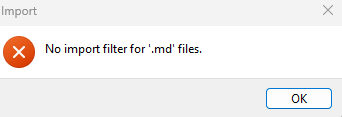
Using Import results in “No import filter for ‘.md’ files.”
Indeed. Although, for Armenian (with the Noto Sans Armenian font) it somehow messes up the commas (maybe something else, can’t judge, I speak no Armenian, just chose it as an example of a script that is “simple” but original and not Latin-based) - have to manually change the font to Noto Sans for every comma (does that fall under the “fallback mechanism” category?). Japanese and Chinese look OK with Noto Sans CJK JP and Noto Sans CJK HK, except “line breaking” - those languages don’t use spaces, so the text is treated as a single huge word, but if it includes a phrase in, for example, English, then it gets improperly broken by one of its spaces.
For example:
ホワイトハウス(英:White House)は、アメリカ合衆国大統領が居住し、執務を行う官邸・公邸。訳語は白堊館(はくあかん、旧字体: 白堊館󠄁[1])。
is rendered as
ホワイトハウス(英:White
House)は、アメリカ合衆国大統領が居住し、執務を行う官邸・公邸。訳語は白堊館(はくあかん、旧字体: 白堊館󠄁[1])。