[wxpython] Is there any control like this?

2011년 10월 21일 오후 1:14, grunculus grunculus@gmail.com님의 말:

Hi,

2011년 10월 21일 오전 10:33, grunculus grunculus@gmail.com님의 말:

http://wiki.wxpython.org/MakingSampleApps cannot be opened here.

Server not found

Firefox can’t find the server at wiki.wxpython.org.

Can you “ping” the server?

If you can’t see the Wiki’s server using the IP address, then it might

be being blocked.

You might have better luck with the copy at the Internet Archive:

http://web.archive.org/web/20090106185611/http://wiki.wxpython.org/MakingSampleApps

I am on linux. and using firefox.

You can run “ping” in a Terminal window on Linux as well:

scott@p7120d:~$ ping wiki.wxpython.org

PING wiki.wxpython.org (85.234.147.122) 56(84) bytes of data.

64 bytes from riobu.com (85.234.147.122): icmp_seq=1 ttl=51 time=97.3 ms

64 bytes from riobu.com (85.234.147.122): icmp_seq=2 ttl=51 time=88.1 ms

64 bytes from riobu.com (85.234.147.122): icmp_seq=3 ttl=51 time=94.8 ms

64 bytes from riobu.com (85.234.147.122): icmp_seq=4 ttl=51 time=91.3 ms

64 bytes from riobu.com (85.234.147.122): icmp_seq=5 ttl=51 time=102 ms

Can you “ping” the wiki.wxpython.org site?

and couldn’t connect

http://web.archive.org/web/20090106185611/http://wiki.wxpython.org/MakingSampleApps

I guess that’s not surprising. Unfortunately.

Here’s the meat of the MakingSampleApps page from the wiki:

=== begin cut ===

How to make a sample

Just to be clear, the sample app you send to the list should not be a

copy of the app you are having trouble with. Nobody wants to read

through all the rest of the code of your app just to figure out one

little problem with one widget 15 clicks away from the startup. It

should also usually not be a copy of your app with lots of stuff

ripped out. To have a chance of solving the problem yourself it is

best to figure out how to make the mistake again, so you can then

figure out what not to do. So here are some suggested steps about how

to make a sample app to send to the list.

  1. Start from scratch with just a frame, a panel and the control(s)

that you are having trouble with, and put it all in one module.

  1. Initialize the control with some typical values like what your app uses.

  2. If it’s applicable to the problem hook up some event handlers

that are the same or similar to what your app uses, if any of them

need app-specific data or functionality then just stub it out with

static or generated bogus data/functionality.

  1. Keep work needed for the previous steps as simple as possible.

Do just enough work to show the problem. For even a novice programmer

with basic wx familiarity these steps should take 15 minutes or less.

  1. Run your sample. If it misbehaves in the same way as your app

then you can usually assume that it is a wxPython problem, or maybe

that you are just using wxPython in the wrong way. Send your sample

and questions about it to the wxPython-users list. If the sample

doesn’t misbehave then it is almost certainly a problem in your app

and you can progressively add things to the sample until you duplicate

the problem and then that can help you to figure out how to fix it in

your app.

  1. When you send your sample app and questions to the

wxPython-users list be sure to mention the version of wxPython you are

using, and also the platform(s) you are using when the problem

manifests itself.

  1. Unless you are absolutely sure that all the lines in your sample

code are short enough to not be word-wrapped by mail software then DO

NOT paste your code into the main body of your email message. Send

your code as an attachment instead. Note that you can not make

attachments when using the Google Groups Web interface to read and

respond to messages, you will need to send an email message from your

subscribed mail address instead. Update: Google has a new beta UI for

the Groups application. If you switch to the new UI you will be able

to attach files to messages posted via their browser interface.

Read the last item above once more. Repeat until it is burned into your memory!

Other helpful hints

  1. wxPython version: Since many of the typical helpers have

multiple versions of wxPython installed on their systems, they will

want to make sure that the version they test with is the same one that

you reported the problem about. I’ve found it helpful to add the

following line into the code just after the wx module is imported. If

you do it for us before you send your sample then that will be another

bit of time that you can save for the helper.

   print wx.version()
  1. Widget Inspection Tool: Another thing that I almost always add

into the samples that are sent to the list are statements for loading

and activating the Widget Inspection Tool, especially if the problem

has to do with layout issues. It gives a simple hierarchical overview

of the widgets and sizers in the application, a way to view common

properties of the widgets, sizers and sizer items, and also a PyCrust

shell for interacting with selected widgets in an interactive Python

interpreter. If you also make use of this tool it may help you to

solve problems yourself before you give up and send the sample to the

mail list. To activate and use the tool simply add these lines into

the sample just before MainLoop is called:

   import wx.lib.inspection

   wx.lib.inspection.InspectionTool().Show()

=== end cut ===

I hope this helps. Good luck.

Cheers,

Scott.

To unsubscribe, send email to wxPython-users+unsubscribe@googlegroups.com

or visit http://groups.google.com/group/wxPython-users?hl=en

ok thank you grunculus

···

2011/10/20 최원준 wonjunchoi001@gmail.com:

2011년 10월 21일 오후 1:50, 최원준 wonjunchoi001@gmail.com님의 말:

2011년 10월 21일 오후 1:14, grunculus grunculus@gmail.com님의 말:

Hi,

2011년 10월 21일 오전 10:33, grunculus grunculus@gmail.com님의 말:

http://wiki.wxpython.org/MakingSampleApps cannot be opened here.

Server not found

Firefox can’t find the server at wiki.wxpython.org.

Can you “ping” the server?

If you can’t see the Wiki’s server using the IP address, then it might

be being blocked.

You might have better luck with the copy at the Internet Archive:

http://web.archive.org/web/20090106185611/http://wiki.wxpython.org/MakingSampleApps

I am on linux. and using firefox.

You can run “ping” in a Terminal window on Linux as well:

scott@p7120d:~$ ping wiki.wxpython.org

PING wiki.wxpython.org (85.234.147.122) 56(84) bytes of data.

64 bytes from riobu.com (85.234.147.122): icmp_seq=1 ttl=51 time=97.3 ms

64 bytes from riobu.com (85.234.147.122): icmp_seq=2 ttl=51 time=88.1 ms

64 bytes from riobu.com (85.234.147.122): icmp_seq=3 ttl=51 time=94.8 ms

64 bytes from riobu.com (85.234.147.122): icmp_seq=4 ttl=51 time=91.3 ms

64 bytes from riobu.com (85.234.147.122): icmp_seq=5 ttl=51 time=102 ms

Can you “ping” the wiki.wxpython.org site?

and couldn’t connect

http://web.archive.org/web/20090106185611/http://wiki.wxpython.org/MakingSampleApps

I guess that’s not surprising. Unfortunately.

Here’s the meat of the MakingSampleApps page from the wiki:

=== begin cut ===

How to make a sample

Just to be clear, the sample app you send to the list should not be a

copy of the app you are having trouble with. Nobody wants to read

through all the rest of the code of your app just to figure out one

little problem with one widget 15 clicks away from the startup. It

should also usually not be a copy of your app with lots of stuff

ripped out. To have a chance of solving the problem yourself it is

best to figure out how to make the mistake again, so you can then

figure out what not to do. So here are some suggested steps about how

to make a sample app to send to the list.

  1. Start from scratch with just a frame, a panel and the control(s)

that you are having trouble with, and put it all in one module.

  1. Initialize the control with some typical values like what your app uses.

  2. If it’s applicable to the problem hook up some event handlers

that are the same or similar to what your app uses, if any of them

need app-specific data or functionality then just stub it out with

static or generated bogus data/functionality.

  1. Keep work needed for the previous steps as simple as possible.

Do just enough work to show the problem. For even a novice programmer

with basic wx familiarity these steps should take 15 minutes or less.

  1. Run your sample. If it misbehaves in the same way as your app

then you can usually assume that it is a wxPython problem, or maybe

that you are just using wxPython in the wrong way. Send your sample

and questions about it to the wxPython-users list. If the sample

doesn’t misbehave then it is almost certainly a problem in your app

and you can progressively add things to the sample until you duplicate

the problem and then that can help you to figure out how to fix it in

your app.

  1. When you send your sample app and questions to the

wxPython-users list be sure to mention the version of wxPython you are

using, and also the platform(s) you are using when the problem

manifests itself.

  1. Unless you are absolutely sure that all the lines in your sample

code are short enough to not be word-wrapped by mail software then DO

NOT paste your code into the main body of your email message. Send

your code as an attachment instead. Note that you can not make

attachments when using the Google Groups Web interface to read and

respond to messages, you will need to send an email message from your

subscribed mail address instead. Update: Google has a new beta UI for

the Groups application. If you switch to the new UI you will be able

to attach files to messages posted via their browser interface.

Read the last item above once more. Repeat until it is burned into your memory!

Other helpful hints

  1. wxPython version: Since many of the typical helpers have

multiple versions of wxPython installed on their systems, they will

want to make sure that the version they test with is the same one that

you reported the problem about. I’ve found it helpful to add the

following line into the code just after the wx module is imported. If

you do it for us before you send your sample then that will be another

bit of time that you can save for the helper.

   print wx.version()
  1. Widget Inspection Tool: Another thing that I almost always add

into the samples that are sent to the list are statements for loading

and activating the Widget Inspection Tool, especially if the problem

has to do with layout issues. It gives a simple hierarchical overview

of the widgets and sizers in the application, a way to view common

properties of the widgets, sizers and sizer items, and also a PyCrust

shell for interacting with selected widgets in an interactive Python

interpreter. If you also make use of this tool it may help you to

solve problems yourself before you give up and send the sample to the

mail list. To activate and use the tool simply add these lines into

the sample just before MainLoop is called:

   import wx.lib.inspection

   wx.lib.inspection.InspectionTool().Show()

=== end cut ===

I hope this helps. Good luck.

Cheers,

Scott.

To unsubscribe, send email to wxPython-users+unsubscribe@googlegroups.com

or visit http://groups.google.com/group/wxPython-users?hl=en

ok thank you grunculus

I passed the current STC object to delete it from Autosizer.
but there is still statictext which is need to be deleted. how can I pass the statictext object to popupmenu?

class STC(st.StyledTextCtrl):

def __init__(self, *args, **kwargs):
    super(STC, self).__init__(*args, **kwargs)

def OnRightDown(self, e):
    control = e.GetEventObject()
    self.PopupMenu(MyPopupMenu(self.GetParent(), control), e.GetPosition())
  • deleting the control from Autosizer
    class MyPopupMenu(wx.Menu):

    def init(self, parent, object):
    super(MyPopupMenu, self).init()

      mmi = wx.MenuItem(self, wx.NewId(), 'Remove')
    
      self.AppendItem(mmi)
      self.Bind(wx.EVT_MENU, self.OnRemove, mmi)
    

    def OnRemove(self, e):
    self.parent.Autosizer.Remove(self.object)
    self.parent.Layout()

  • adding the control to Autosizer.

class TestPanel(wx.Panel):
def init(self, parent):
wx.Panel.init(self, parent, -1)

    self.Autosizer = wx.FlexGridSizer(rows=1, cols=2, hgap = -190, vgap = -1)
    self.Autosizer.SetFlexibleDirection(wx.VERTICAL)

    self.SetSizer(self.Autosizer)

def OnAddPython(self, event):
    self.text = wx.StaticText(self, label='P')
    self.editor = STC(self)
    self.Autosizer.Add(self.text,0)

    self.Autosizer.Add(self.editor,1, wx.EXPAND)
    self.Layout()
···

2011/10/20 최원준 wonjunchoi001@gmail.com:
2011년 10월 21일 오후 3:52, 최원준 wonjunchoi001@gmail.com님의 말:

2011년 10월 21일 오후 1:50, 최원준 wonjunchoi001@gmail.com님의 말:

2011년 10월 21일 오후 1:14, grunculus grunculus@gmail.com님의 말:

Hi,

2011년 10월 21일 오전 10:33, grunculus grunculus@gmail.com님의 말:

http://wiki.wxpython.org/MakingSampleApps cannot be opened here.

Server not found

Firefox can’t find the server at wiki.wxpython.org.

Can you “ping” the server?

If you can’t see the Wiki’s server using the IP address, then it might

be being blocked.

You might have better luck with the copy at the Internet Archive:

http://web.archive.org/web/20090106185611/http://wiki.wxpython.org/MakingSampleApps

I am on linux. and using firefox.

You can run “ping” in a Terminal window on Linux as well:

scott@p7120d:~$ ping wiki.wxpython.org

PING wiki.wxpython.org (85.234.147.122) 56(84) bytes of data.

64 bytes from riobu.com (85.234.147.122): icmp_seq=1 ttl=51 time=97.3 ms

64 bytes from riobu.com (85.234.147.122): icmp_seq=2 ttl=51 time=88.1 ms

64 bytes from riobu.com (85.234.147.122): icmp_seq=3 ttl=51 time=94.8 ms

64 bytes from riobu.com (85.234.147.122): icmp_seq=4 ttl=51 time=91.3 ms

64 bytes from riobu.com (85.234.147.122): icmp_seq=5 ttl=51 time=102 ms

Can you “ping” the wiki.wxpython.org site?

and couldn’t connect

http://web.archive.org/web/20090106185611/http://wiki.wxpython.org/MakingSampleApps

I guess that’s not surprising. Unfortunately.

Here’s the meat of the MakingSampleApps page from the wiki:

=== begin cut ===

How to make a sample

Just to be clear, the sample app you send to the list should not be a

copy of the app you are having trouble with. Nobody wants to read

through all the rest of the code of your app just to figure out one

little problem with one widget 15 clicks away from the startup. It

should also usually not be a copy of your app with lots of stuff

ripped out. To have a chance of solving the problem yourself it is

best to figure out how to make the mistake again, so you can then

figure out what not to do. So here are some suggested steps about how

to make a sample app to send to the list.

  1. Start from scratch with just a frame, a panel and the control(s)

that you are having trouble with, and put it all in one module.

  1. Initialize the control with some typical values like what your app uses.

  2. If it’s applicable to the problem hook up some event handlers

that are the same or similar to what your app uses, if any of them

need app-specific data or functionality then just stub it out with

static or generated bogus data/functionality.

  1. Keep work needed for the previous steps as simple as possible.

Do just enough work to show the problem. For even a novice programmer

with basic wx familiarity these steps should take 15 minutes or less.

  1. Run your sample. If it misbehaves in the same way as your app

then you can usually assume that it is a wxPython problem, or maybe

that you are just using wxPython in the wrong way. Send your sample

and questions about it to the wxPython-users list. If the sample

doesn’t misbehave then it is almost certainly a problem in your app

and you can progressively add things to the sample until you duplicate

the problem and then that can help you to figure out how to fix it in

your app.

  1. When you send your sample app and questions to the

wxPython-users list be sure to mention the version of wxPython you are

using, and also the platform(s) you are using when the problem

manifests itself.

  1. Unless you are absolutely sure that all the lines in your sample

code are short enough to not be word-wrapped by mail software then DO

NOT paste your code into the main body of your email message. Send

your code as an attachment instead. Note that you can not make

attachments when using the Google Groups Web interface to read and

respond to messages, you will need to send an email message from your

subscribed mail address instead. Update: Google has a new beta UI for

the Groups application. If you switch to the new UI you will be able

to attach files to messages posted via their browser interface.

Read the last item above once more. Repeat until it is burned into your memory!

Other helpful hints

  1. wxPython version: Since many of the typical helpers have

multiple versions of wxPython installed on their systems, they will

want to make sure that the version they test with is the same one that

you reported the problem about. I’ve found it helpful to add the

following line into the code just after the wx module is imported. If

you do it for us before you send your sample then that will be another

bit of time that you can save for the helper.

   print wx.version()
  1. Widget Inspection Tool: Another thing that I almost always add

into the samples that are sent to the list are statements for loading

and activating the Widget Inspection Tool, especially if the problem

has to do with layout issues. It gives a simple hierarchical overview

of the widgets and sizers in the application, a way to view common

properties of the widgets, sizers and sizer items, and also a PyCrust

shell for interacting with selected widgets in an interactive Python

interpreter. If you also make use of this tool it may help you to

solve problems yourself before you give up and send the sample to the

mail list. To activate and use the tool simply add these lines into

the sample just before MainLoop is called:

   import wx.lib.inspection

   wx.lib.inspection.InspectionTool().Show()

=== end cut ===

I hope this helps. Good luck.

Cheers,

Scott.

To unsubscribe, send email to wxPython-users+unsubscribe@googlegroups.com

or visit http://groups.google.com/group/wxPython-users?hl=en

ok thank you grunculus

I passed the current STC object to delete it from Autosizer.
but there is still statictext which is need to be deleted. how can I pass the statictext object to popupmenu?

class STC(st.StyledTextCtrl):

def __init__(self, *args, **kwargs):

super(STC, self).init(*args, **kwargs)

def OnRightDown(self, e):
    control = e.GetEventObject()
    self.PopupMenu(MyPopupMenu(self.GetParent(), control), e.GetPosition())
  • deleting the control from Autosizer
    class MyPopupMenu(wx.Menu):

    def init(self, parent, object):
    super(MyPopupMenu, self).init()

      mmi = wx.MenuItem(self, wx.NewId(), 'Remove')
    
    
      self.AppendItem(mmi)
      self.Bind(wx.EVT_MENU, self.OnRemove, mmi)
    

    def OnRemove(self, e):

self.parent.Autosizer.Remove(self.object)
self.parent.Layout()

  • adding the control to Autosizer.

class TestPanel(wx.Panel):
def init(self, parent):

wx.Panel.init(self, parent, -1)

    self.Autosizer = wx.FlexGridSizer(rows=1, cols=2, hgap = -190, vgap = -1)
    self.Autosizer.SetFlexibleDirection(wx.VERTICAL)


    self.SetSizer(self.Autosizer)

def OnAddPython(self, event):
    self.text = wx.StaticText(self, label='P')
    self.editor = STC(self)
    self.Autosizer.Add(self.text,0)


    self.Autosizer.Add(self.editor,1, wx.EXPAND)
    self.Layout()

I think below method is more useful than getting object. but there is some overlapped symtom. I don’t know why.

    Row = 1
    self.parent.Autosizer.Remove(Row+1)

    self.parent.Autosizer.Remove(Row)
    self.parent.Layout()
···

2011/10/20 최원준 wonjunchoi001@gmail.com:

  I passed the current STC object to delete it from Autosizer.

  but there is still statictext which is need to be deleted. how can

I pass the statictext object to popupmenu?

  class STC(st.StyledTextCtrl):

      def __init__(self, *args, **kwargs):

          super(STC, self).__init__(*args, **kwargs)


      def OnRightDown(self, e):

          control = e.GetEventObject()

          self.PopupMenu(MyPopupMenu(self.GetParent(), control),

e.GetPosition())

  * deleting the control from Autosizer

  class MyPopupMenu(wx.Menu):


      def __init__(self, parent, object):

          super(MyPopupMenu, self).__init__()


          mmi = wx.MenuItem(self, wx.NewId(), 'Remove')

          self.AppendItem(mmi)

          self.Bind(wx.EVT_MENU, self.OnRemove, mmi)


      def OnRemove(self, e):

          self.parent.Autosizer.Remove(self.object)

          self.parent.Layout()


  * adding the control to Autosizer.

  class TestPanel(wx.Panel):

      def __init__(self, parent):

          wx.Panel.__init__(self, parent, -1)


          self.Autosizer = wx.FlexGridSizer(rows=1, cols=2, hgap =

-190, vgap = -1)

          self.Autosizer.SetFlexibleDirection(wx.VERTICAL)


          self.SetSizer(self.Autosizer)


      def OnAddPython(self, event):

          self.text = wx.StaticText(self, label='P')

          self.editor = STC(self)

          self.Autosizer.Add(self.text,0)

          self.Autosizer.Add(self.editor,1, wx.EXPAND)

          self.Layout()


  --

  To unsubscribe, send email to

or visit
As I said 60 messages back you need to stop doing this:

        self.text = wx.StaticText(self, label='P')

        self.editor = STC(self)

and start doing something like this:

        newtext = wx.StaticText(self, label='P')

        newstc = STC(self)

        self.control_pairs.add((newtext, newstc))

then you can
  1. find the index of the STC that your pop-up came from,
  2. get the editor and static text pair for that index
  3. remove them from the lists, self.texts and self.editor
  4. delete them
    You need to keep track of things individually.
···

wxPython-users+unsubscribe@googlegroups.com
http://groups.google.com/group/wxPython-users?hl=en

Please reread my "Note this assumes that..." above. You need some other way to keep track of your widgets other than assigning all of them to the same variables.

  self.s = 'a'
  self.s = 'b'
  self.s = 'c'

When you have done that what does self.s refer to? How do you expect to be able to do something with the first or second strings?

···

On 10/20/11 7:49 PM, 최원준 wrote:

2011/10/21 Robin Dunn <robin@alldunn.com <mailto:robin@alldunn.com>>

    On 10/20/11 6:13 PM, 최원준 wrote:

     >
     > when I added the control to FlexSizer, I did like this :
     > self.Autosizer.Add(self.text,0)
     > self.Autosizer.Add(self.editor,1, wx.EXPAND)
     >
     > but I am not sure when I delete the control from FlexSizer, how
    can I do?:
     > Row = 0
     > self.Autosizer.Remove(Row+1) # Need to remove last first
     > self.Autosizer.Remove(Row)
     > self.Layout()
     > when I do like this, the result was as screenshot

    self.text.Destroy()
    self.editor.Destroy()
    self.Layout()

    The widgets will remove themselves from the sizer when they are
    destroyed. Note that this assumes that you still have a reference to
    the actual widgets that you want to remove, and that you did not assign
    all of them to the same self.text and self.editor variables.

when I coded like this, it deleted the latest text and editor from
FlexSizer.

--
Robin Dunn
Software Craftsman

Good morning,

What is your problem in accessing the wxPython web site? This is a
resource you have to be able to access if you want to learn wxPython, so
resolve this issue. If you can't resolve it yourself then provide
information which will allow others to help you.

Imagine one day you distribute your application and a user comes back to
you and says I started your application but it doesn't work. Do you
think you will be able to help this user with the information I just
gave you in the previous sentence?

If you run a Python program and you get a traceback and you don't know
how to resolve it then you have to post the whole traceback and the
relevant portion of your code and define which line of your code is
referenced in the traceback.

When you answer to a post it is very useful to "trim" the text of the
message you reply to, i.e. remove text which is no longer relevant.

I still don't understand what you are trying to accomplish with your
control and frankly I find it always a bit strange when controls are
created, then they are deleted and then created again - which I kind of
guess you will want to do. You might get a better solution if you would
describe the use case you would like to handle.

Anyhow, based on the code you included in one of your latest post I
created a "Sample Application" which anyone should be able to run.

What did I do:
- I took your code snippets
- added a wx.App including the WIT (see the wxPython wiki for more
details on this)
- changed the sizer creation code so it would run in wxPython 2.9
- added a button so OnAddPython could be run
- added the necessary imports
- added the code so one can just run this

All the above took time and all of us have more or less time available
to help people, that is why you see that people often ask for creating a
sample application which one can just run - it is a much faster way of
helping you who has the problem/question.

In addition doing a sample application of your problem often means that
you will find the problem you have your self - this has happened to me I
don't know how many times.

The attached code allows to created controls, but the removing of
controls is not working as the PopupMenu is not shown - haven't time to
figure this out at the moment.

With regards of deleting the STC and StaticText you will have to find a
method to keep the reference of the different controls, currently the
"self.text" and "self.editor" are being used again and again. Instead of
naming them (keeping a reference) you might think of creating a
dictionary and keep track that way of the controls you created and then
you can use that dictionary to remove controls.

Werner

removectrl.py (1.73 KB)

2011년 10월 21일 오후 5:20, Robin Dunn robin@alldunn.com님의 말:

2011/10/21 Robin Dunn <robin@alldunn.com mailto:robin@alldunn.com>

 >

 > when I added the control to FlexSizer, I did like this :

 > self.Autosizer.Add(self.text,0)

 > self.Autosizer.Add(self.editor,1, wx.EXPAND)

 >

 > but I am not sure when I delete the control from FlexSizer, how

can I do?:

 > Row = 0

 > self.Autosizer.Remove(Row+1) # Need to remove last first

 > self.Autosizer.Remove(Row)

 > self.Layout()

 > when I do like this, the result was as screenshot


self.text.Destroy()

self.editor.Destroy()

self.Layout()


The widgets will remove themselves from the sizer when they are

destroyed. Note that this assumes that you still have a reference to

the actual widgets that you want to remove, and that you did not assign

all of them to the same self.text and self.editor variables.

when I coded like this, it deleted the latest text and editor from

FlexSizer.

Please reread my “Note this assumes that…” above. You need some other way to keep track of your widgets other than assigning all of them to the same variables.

    self.s = 'a'

    self.s = 'b'

    self.s = 'c'

When you have done that what does self.s refer to? How do you expect to be able to do something with the first or second strings?

Robin Dunn

Software Craftsman

http://wxPython.org

To unsubscribe, send email to wxPython-users+unsubscribe@googlegroups.com

or visit http://groups.google.com/group/wxPython-users?hl=en

it indicates different language

    self.text = wx.StaticText(self, label='P')

        self.editor = PythonSTC(self)
    self.text = wx.StaticText(self, label='C')

        self.editor = CSTC(self)
    self.text = wx.StaticText(self, label='F')

        self.editor = FortranSTC(self)

and I am thinking about alternative way in order to do this : self.control_pairs.add(sizer1) as you can see in screenshot
I am not sure that i can delete sizer1 from Autosizer using Autosizer.Remove(sizer1) or Autosizer.Remove(0) : Autosizer.Remove(sizer2) or Autosizer.Remove(1)

···

On 10/20/11 7:49 PM, 최원준 wrote:

On 10/20/11 6:13 PM, 최원준 wrote:

2011년 10월 21일 오후 5:36, 최원준 wonjunchoi001@gmail.com님의 말:

2011년 10월 21일 오후 5:20, Robin Dunn robin@alldunn.com님의 말:

2011/10/21 Robin Dunn <robin@alldunn.com mailto:robin@alldunn.com>

 >

 > when I added the control to FlexSizer, I did like this :

 > self.Autosizer.Add(self.text,0)

 > self.Autosizer.Add(self.editor,1, wx.EXPAND)

 >

 > but I am not sure when I delete the control from FlexSizer, how

can I do?:

 > Row = 0

 > self.Autosizer.Remove(Row+1) # Need to remove last first

 > self.Autosizer.Remove(Row)

 > self.Layout()

 > when I do like this, the result was as screenshot


self.text.Destroy()

self.editor.Destroy()

self.Layout()


The widgets will remove themselves from the sizer when they are

destroyed. Note that this assumes that you still have a reference to

the actual widgets that you want to remove, and that you did not assign

all of them to the same self.text and self.editor variables.

when I coded like this, it deleted the latest text and editor from

FlexSizer.

Please reread my “Note this assumes that…” above. You need some other way to keep track of your widgets other than assigning all of them to the same variables.

    self.s = 'a'

    self.s = 'b'

    self.s = 'c'

When you have done that what does self.s refer to? How do you expect to be able to do something with the first or second strings?

Robin Dunn

Software Craftsman

http://wxPython.org

To unsubscribe, send email to wxPython-users+unsubscribe@googlegroups.com

or visit http://groups.google.com/group/wxPython-users?hl=en

it indicates different language

    self.text = wx.StaticText(self, label='P')

self.editor = PythonSTC(self)
self.text = wx.StaticText(self, label=‘C’)

        self.editor = CSTC(self)

    self.text = wx.StaticText(self, label='F')

self.editor = FortranSTC(self)

and I am thinking about alternative way in order to do this : self.control_pairs.add(sizer1) as you can see in screenshot
I am not sure that i can delete sizer1 from Autosizer using Autosizer.Remove(sizer1) or Autosizer.Remove(0) : Autosizer.Remove(sizer2) or Autosizer.Remove(1)

dear werner,

thank you, I just fixed the code you uploaded. remove button will work.

removectrl.py (2 KB)

···

On 10/20/11 7:49 PM, 최원준 wrote:

On 10/20/11 6:13 PM, 최원준 wrote:

OK as for the access to website- probs:
- do not ping but traceroute (and tracert under win)
This will show you where it fails.
It will show you all the hops a request and following your traffic
to (and later from) a destination is passing.
The command:
traceroute wiki.wxpython.org
traceroute to wiki.wxpython.org (85.234.147.122), 64 hops max, 52
byte packets => It can resolve the IP, thus dns is ok
1 192.168.1.1 (bouncer.xchg.private) 3.288 ms 3.183 ms 2.862 ms** => the gateway/ router/proxy - fine so now the gateway is
taking over and is supposed to send the request for the IP through
it’s set routes(i.e. the provider’s part)**
2 rdsl-rgnb-de01.nw.mediaways.net (213.20.57.3) 25.461 ms 26.116
ms 25.266 ms ** => provider stuff … from there on it’s not
in your hands anymore**

 3  xmws-rgnb-de01-chan-18.nw.mediaways.net (195.71.232.250)  24.704

ms 24.950 ms 25.267 ms

 4  hex89-linx.as29550.net (195.66.226.223)  57.285 ms  58.583 ms 

92.158 ms

 5  vl668.the-7600.as29550.net (92.48.95.10)  58.507 ms  60.921 ms 

57.904 ms

 6  pri.the-mka_450.as29550.net (94.76.244.22)  60.222 ms  60.489

ms 59.693 ms

 7  213-229-84-140.static.as29550.net (213.229.84.140)  59.610 ms 

58.984 ms 59.199 ms

 8  riobu.com (85.234.147.122)  60.009 ms  59.112 ms  59.588 ms

You cal also post the output if u r unsure ....

.. but then again... isn't this the wx.Python list?

;-)

Cheers,

T
···

...

Please reread my "Note this assumes that..." above. You need some other way to keep track of your widgets other than assigning all of them to the same variables.

           self.s = 'a'
           self.s = 'b'
           self.s = 'c'

    When you have done that what does self.s refer to? How do you expect to be able to do something with the first or second strings?

"what does self.s refer to" - the answer to this is "c"

...

it indicates different language

        self.text = wx.StaticText(self, label='P')
        self.editor = PythonSTC(self)
        self.text = wx.StaticText(self, label='C')
        self.editor = CSTC(self)
        self.text = wx.StaticText(self, label='F')
        self.editor = FortranSTC(self)

and I am thinking about alternative way in order to do this : self.control_pairs.add(sizer1) as you can see in screenshot
I am not sure that i can delete sizer1 from Autosizer using Autosizer.Remove(sizer1) or Autosizer.Remove(0) : Autosizer.Remove(sizer2) or Autosizer.Remove(1)

You keep not reading the answers you are getting. I can see that some
of it is maybe because English is a foreign language to you (BTW, it
is for me too, so sometimes one has to take a bit more time reading
answers and/or questions).

Robin just told you not to name all the StaticText controls
"self.text" and all the STC's "self.editor", this won't help you in
any way and it is in my view a confusing coding style.

Why not be explicit:

        self.textP = wx.StaticText(self, label='P')
        self.editorP = PythonSTC(self)
        self.textC = wx.StaticText(self, label='C')
        self.editorC = CSTC(self)
        self.textF = wx.StaticText(self, label='F')
        self.editorF = FortranSTC(self)

Or if you never need to use the variables you could do something like
this (untested).

    self.trackCtrls = {}
    for item in ["P", "C", "F"]:
        text = wx.StaticText(self, label=item)
        if item == "P":
            editor = PythonSTC(self)
        elif item == "C":
            editor = CSTC(self)

        self.trackCtrls[editor] = text

Then use self.trackCtrls to find which StaticText belongs to which
editor when you want to remove them.

Werner

each STC can be multiful

   self.textP = wx.StaticText(self, label='P')

   self.editorP = PythonSTC(self)
   self.textC = wx.StaticText(self, label='C')
   self.editorC = CSTC(self)
   self.textF = wx.StaticText(self, label='F')
   self.editorF = FortranSTC(self)

so this way is not good.

for example, self.textP can be more than one.

···

2011/10/21 werner wbruhin@free.fr

Please reread my “Note this assumes that…” above. You need some other way to keep track of your widgets other than assigning all of them to the same variables.

       self.s = 'a'
       self.s = 'b'
       self.s = 'c'
When you have done that what does self.s refer to?  How do you expect to be able to do something with the first or second strings?

“what does self.s refer to” - the answer to this is “c”

it indicates different language

    self.text = wx.StaticText(self, label='P')
    self.editor = PythonSTC(self)
    self.text = wx.StaticText(self, label='C')
    self.editor = CSTC(self)
    self.text = wx.StaticText(self, label='F')
    self.editor = FortranSTC(self)

and I am thinking about alternative way in order to do this : self.control_pairs.add(sizer1) as you can see in screenshot

I am not sure that i can delete sizer1 from Autosizer using Autosizer.Remove(sizer1) or Autosizer.Remove(0) : Autosizer.Remove(sizer2) or Autosizer.Remove(1)

You keep not reading the answers you are getting. I can see that some

of it is maybe because English is a foreign language to you (BTW, it

is for me too, so sometimes one has to take a bit more time reading

answers and/or questions).

Robin just told you not to name all the StaticText controls

“self.text” and all the STC’s “self.editor”, this won’t help you in

any way and it is in my view a confusing coding style.

Why not be explicit:

    self.textP = wx.StaticText(self, label='P')

    self.editorP = PythonSTC(self)

    self.textC = wx.StaticText(self, label='C')

    self.editorC = CSTC(self)

    self.textF = wx.StaticText(self, label='F')

    self.editorF = FortranSTC(self)

Or if you never need to use the variables you could do something like

this (untested).

self.trackCtrls = {}

for item in ["P", "C", "F"]:

    text = wx.StaticText(self, label=item)

    if item == "P":

        editor = PythonSTC(self)

    elif item == "C":

        editor = CSTC(self)


    self.trackCtrls[editor] = text

Then use self.trackCtrls to find which StaticText belongs to which

editor when you want to remove them.

Werner

To unsubscribe, send email to wxPython-users+unsubscribe@googlegroups.com

or visit http://groups.google.com/group/wxPython-users?hl=en

Hmm... It's really too bad that Python doesn't have a nice, convenient, flexible container object that can hold any number of any kind of items. Oh wait, it does. Several of them in fact.

···

On 10/21/11 6:27 PM, 최원준 wrote:

each STC can be multiful

        self.textP = wx.StaticText(self, label='P')
        self.editorP = PythonSTC(self)
        self.textC = wx.StaticText(self, label='C')
        self.editorC = CSTC(self)
        self.textF = wx.StaticText(self, label='F')
        self.editorF = FortranSTC(self)

so this way is not good.
for example, self.textP can be more than one.

--
Robin Dunn
Software Craftsman

And I and several others have suggested using on of them several times
in this thread to no avail.

Gadget/Steve

···

On 22/10/2011 4:18 AM, Robin Dunn wrote:

On 10/21/11 6:27 PM, 최원준 wrote:

each STC can be multiful

        self.textP = wx.StaticText(self, label='P')
        self.editorP = PythonSTC(self)
        self.textC = wx.StaticText(self, label='C')
        self.editorC = CSTC(self)
        self.textF = wx.StaticText(self, label='F')
        self.editorF = FortranSTC(self)

so this way is not good.
for example, self.textP can be more than one.

Hmm... It's really too bad that Python doesn't have a nice,
convenient, flexible container object that can hold any number of any
kind of items. Oh wait, it does. Several of them in fact.

I think I must think about the index of each control to control them.

so, I thought python list. because some example of wx.Flexgridsizer was using

the list. ex) puzzle example in http://zetcode.com/wxpython/gripts/

  1. find the index of the STC that your pop-up came from <= there was no GetItemIndex in FlexSizer. so I doubt I can get the index of the selected control. and I have used event.GetEventObject() to get current stc object. but there is still statictext control. so I am trying continuously.
  2. get the editor and static text pair for that index
  3. remove them from the lists, self.texts and self.editor
  4. delete them
···

2011/10/22 Gadget/Steve GadgetSteve@live.co.uk

On 22/10/2011 4:18 AM, Robin Dunn wrote:

On 10/21/11 6:27 PM, 최원준 wrote:

each STC can be multiful

    self.textP = wx.StaticText(self, label='P')
    self.editorP = PythonSTC(self)
    self.textC = wx.StaticText(self, label='C')
    self.editorC = CSTC(self)
    self.textF = wx.StaticText(self, label='F')
    self.editorF = FortranSTC(self)

so this way is not good.

for example, self.textP can be more than one.

Hmm… It’s really too bad that Python doesn’t have a nice,

convenient, flexible container object that can hold any number of any

kind of items. Oh wait, it does. Several of them in fact.

And I and several others have suggested using on of them several times

in this thread to no avail.

Gadget/Steve

To unsubscribe, send email to wxPython-users+unsubscribe@googlegroups.com

or visit http://groups.google.com/group/wxPython-users?hl=en

    I think I must think about the index of each control to

control them.

    so, I thought python list. because some example of

wx.Flexgridsizer was using

the list. ex) puzzle example in http://zetcode.com/wxpython/gripts/

  1.           find the index of the STC
    

that your pop-up came from <= there was no GetItemIndex
in FlexSizer. so I doubt I can get the index of the
selected control. and I have used event.GetEventObject()
to get current stc object. but there is still statictext
control. so I am trying continuously.

  1.           get the editor and static
    

text pair for that index

  1.           remove them from the lists,
    

self.texts and self.editor

  1. delete them

Python list? I think a dictionary might be better/easier for this.

See attached.

Werner

removectrl.py (1.75 KB)

···

On 10/22/2011 01:54 PM, 최원준 wrote:

It works well. thank you for your advice all. (Gadget/Steve, werner, Robin Dunn, Tobias Weber, CM, Andrea Gavana, Steven Sproat, Tim Roberts, grunculus)

Wonjun, Choi

···

2011/10/22 werner wbruhin@free.fr

On 10/22/2011 01:54 PM, 최원준 wrote:

...
    I think I must think about the index of each control to

control them.

    so, I thought python list. because some example of

wx.Flexgridsizer was using

the list. ex) puzzle example in http://zetcode.com/wxpython/gripts/

  1.           find the index of the STC
    

that your pop-up came from <= there was no GetItemIndex
in FlexSizer. so I doubt I can get the index of the
selected control. and I have used event.GetEventObject()
to get current stc object. but there is still statictext
control. so I am trying continuously.

  1.           get the editor and static
    

text pair for that index

  1.           remove them from the lists,
    

self.texts and self.editor

  1. delete them

Python list? I think a dictionary might be better/easier for this.

See attached.


Werner

To unsubscribe, send email to wxPython-users+unsubscribe@googlegroups.com

or visit http://groups.google.com/group/wxPython-users?hl=en

2011년 10월 23일 오후 10:09, 최원준 wonjunchoi001@gmail.com님의 말:

...
    I think I must think about the index of each control to

control them.

    so, I thought python list. because some example of

wx.Flexgridsizer was using

the list. ex) puzzle example in http://zetcode.com/wxpython/gripts/

  1.           find the index of the STC
    

that your pop-up came from <= there was no GetItemIndex
in FlexSizer. so I doubt I can get the index of the
selected control. and I have used event.GetEventObject()
to get current stc object. but there is still statictext
control. so I am trying continuously.

  1.           get the editor and static
    

text pair for that index

  1.           remove them from the lists,
    

self.texts and self.editor

  1. delete them

Python list? I think a dictionary might be better/easier for this.

See attached.


Werner

To unsubscribe, send email to wxPython-users+unsubscribe@googlegroups.com

or visit http://groups.google.com/group/wxPython-users?hl=en

It works well. thank you for your advice all. (Gadget/Steve, werner, Robin Dunn, Tobias Weber, CM, Andrea Gavana, Steven Sproat, Tim Roberts, grunculus)

Wonjun, Choi

hello.

I have a problem.

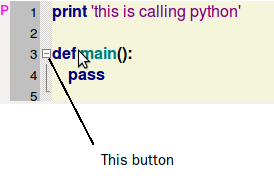
when I add pythonSTC or fortranSTC to sizer, the folding button is not working. Does anyone know the reason?

···

2011/10/22 werner wbruhin@free.fr

On 10/22/2011 01:54 PM, 최원준 wrote:

2011년 10월 24일 오후 1:48, 최원준 wonjunchoi001@gmail.com님의 말:

2011년 10월 23일 오후 10:09, 최원준 wonjunchoi001@gmail.com님의 말:

...
    I think I must think about the index of each control to

control them.

    so, I thought python list. because some example of

wx.Flexgridsizer was using

the list. ex) puzzle example in http://zetcode.com/wxpython/gripts/

  1.           find the index of the STC
    

that your pop-up came from <= there was no GetItemIndex
in FlexSizer. so I doubt I can get the index of the
selected control. and I have used event.GetEventObject()
to get current stc object. but there is still statictext
control. so I am trying continuously.

  1.           get the editor and static
    

text pair for that index

  1.           remove them from the lists,
    

self.texts and self.editor

  1. delete them

Python list? I think a dictionary might be better/easier for this.

See attached.


Werner

To unsubscribe, send email to wxPython-users+unsubscribe@googlegroups.com

or visit http://groups.google.com/group/wxPython-users?hl=en

It works well. thank you for your advice all. (Gadget/Steve, werner, Robin Dunn, Tobias Weber, CM, Andrea Gavana, Steven Sproat, Tim Roberts, grunculus)

Wonjun, Choi

hello.

I have a problem.

when I add pythonSTC or fortranSTC to sizer, the folding button is not working. Does anyone know the reason?

I am sorry. I forgot an event function.

    self.Bind(stc.EVT_STC_UPDATEUI, self.onUpdateUI)
    self.Bind(stc.EVT_STC_MARGINCLICK, self.onMarginClick)
    self.Bind(wx.EVT_KEY_DOWN, self.onKeyPressed)
···

2011/10/22 werner wbruhin@free.fr

On 10/22/2011 01:54 PM, 최원준 wrote:

2011년 10월 24일 오후 5:11, 최원준 wonjunchoi001@gmail.com님의 말:

2011년 10월 24일 오후 1:48, 최원준 wonjunchoi001@gmail.com님의 말:

2011년 10월 23일 오후 10:09, 최원준 wonjunchoi001@gmail.com님의 말:

...
    I think I must think about the index of each control to

control them.

    so, I thought python list. because some example of

wx.Flexgridsizer was using

the list. ex) puzzle example in http://zetcode.com/wxpython/gripts/

  1.           find the index of the STC
    

that your pop-up came from <= there was no GetItemIndex
in FlexSizer. so I doubt I can get the index of the
selected control. and I have used event.GetEventObject()
to get current stc object. but there is still statictext
control. so I am trying continuously.

  1.           get the editor and static
    

text pair for that index

  1.           remove them from the lists,
    

self.texts and self.editor

  1. delete them

Python list? I think a dictionary might be better/easier for this.

See attached.


Werner

To unsubscribe, send email to wxPython-users+unsubscribe@googlegroups.com

or visit http://groups.google.com/group/wxPython-users?hl=en

It works well. thank you for your advice all. (Gadget/Steve, werner, Robin Dunn, Tobias Weber, CM, Andrea Gavana, Steven Sproat, Tim Roberts, grunculus)

Wonjun, Choi

hello.

I have a problem.

when I add pythonSTC or fortranSTC to sizer, the folding button is not working. Does anyone know the reason?

I am sorry. I forgot an event function.

    self.Bind(stc.EVT_STC_UPDATEUI, self.onUpdateUI)
    self.Bind(stc.EVT_STC_MARGINCLICK, self.onMarginClick)
    self.Bind(wx.EVT_KEY_DOWN, self.onKeyPressed)

when I inserted the controls by below method, the controls were appended strangely. Does anyone know why?

    self.Autosizer.Insert(1, self.text)
    self.Autosizer.Insert(1, self.editor)
···

2011/10/22 werner wbruhin@free.fr

On 10/22/2011 01:54 PM, 최원준 wrote:

Because both were inserted at position 1, so the ‘first’ becomes the
second and assuming that you are still following the previous
pattern, two cols, you need to insert the first at position 2 and
the second at position 3.

···

wxPython-users+unsubscribe@googlegroups.com
http://groups.google.com/group/wxPython-users?hl=en