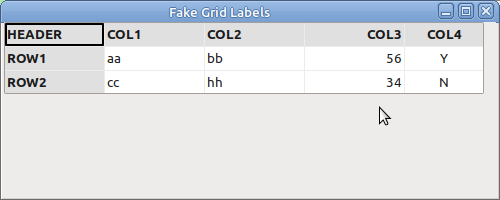
OK, if we can’t change the alignment of the row and column labels in a Grid control, perhaps we could hide the real ones and make the first row and first column look like headers?
Here is a quick example:
import wx
import wx.grid as grid

class MyForm(wx.Frame):

    def __init__(self):
        """Constructor"""
        wx.Frame.__init__(self, parent=None, title="Fake Grid Labels", size=(500, 200))
        panel = wx.Panel(self)

        self.grid = grid.Grid(panel)
        self.grid.CreateGrid(3, 5)

        self.grid.HideColLabels()
        self.grid.HideRowLabels()

        self.grid.SetColSize(0, 100)
        self.grid.SetColSize(1, 100)
        self.grid.SetColSize(2, 100)
        self.grid.SetColSize(3, 100)

        font = self.grid.GetLabelFont()
        bg = "#e0e0e0"

        self.grid.SetCellValue(0, 0, "HEADER")
        self.grid.SetCellValue(0, 1, "COL1")
        self.grid.SetCellValue(0, 2, "COL2")
        self.grid.SetCellValue(0, 3, "COL3")
        self.grid.SetCellValue(0, 4, "COL4")

        for c in range(5):
            self.grid.SetCellFont(0, c, font)
            self.grid.SetCellBackgroundColour(0, c, bg)

        self.grid.SetCellValue(1, 0, "ROW1")
        self.grid.SetCellFont(1, 0, font)
        self.grid.SetCellValue(1, 1, "aa")
        self.grid.SetCellValue(1, 2, "bb")
        self.grid.SetCellValue(1, 3, "56")
        self.grid.SetCellValue(1, 4, "Y")
        self.grid.SetCellValue(2, 0, "ROW2")
        self.grid.SetCellFont(2, 0, font)
        self.grid.SetCellValue(2, 1, "cc")
        self.grid.SetCellValue(2, 2, "hh")
        self.grid.SetCellValue(2, 3, "34")
        self.grid.SetCellValue(2, 4, "N")

        for r in range(1, 3):
            self.grid.SetCellFont(r, 0, font)
            self.grid.SetCellBackgroundColour(r, 0, bg)


        attr = wx.grid.GridCellAttr()
        attr.SetAlignment(wx.ALIGN_LEFT, wx.ALIGN_CENTRE)
        self.grid.SetColAttr(0, attr)
        attr = wx.grid.GridCellAttr()
        attr.SetAlignment(wx.ALIGN_LEFT, wx.ALIGN_CENTRE)
        self.grid.SetColAttr(1, attr)
        attr = wx.grid.GridCellAttr()
        attr.SetAlignment(wx.ALIGN_LEFT, wx.ALIGN_CENTRE)
        self.grid.SetColAttr(2, attr)
        attr = wx.grid.GridCellAttr()
        attr.SetAlignment(wx.ALIGN_RIGHT, wx.ALIGN_CENTRE)
        self.grid.SetColAttr(3, attr)
        attr = wx.grid.GridCellAttr()
        attr.SetAlignment(wx.ALIGN_CENTRE, wx.ALIGN_CENTRE)
        self.grid.SetColAttr(4, attr)

        sizer = wx.BoxSizer(wx.VERTICAL)
        sizer.Add(self.grid)
        panel.SetSizer(sizer)


if __name__ == "__main__":
    app = wx.App()
    frame = MyForm()
    frame.Show()
    app.MainLoop()